APU Spectrum Analyzer – Visual Mix Tool

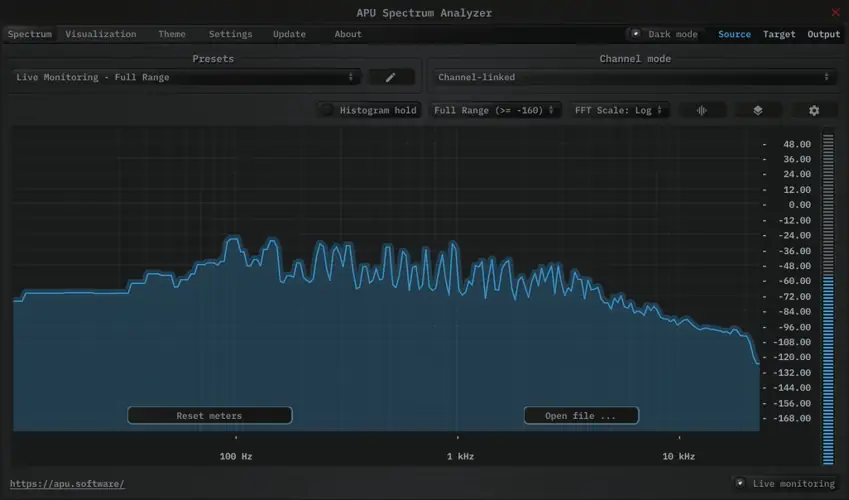
Is your low-end eating up all your headroom, but you can’t figure out why? Or maybe your snare is getting buried, and you’re tired of guessing frequencies?
Yo, what’s good fam. Listen up. We’ve all been there—sitting in the studio at 3 AM, ears fatigued, trying to figure out why the mix sounds muddy. You can’t fix what you can’t identify. If you’re mixing in an untreated room or just on headphones, your ears can lie to you. That’s why you need a visual reference that doesn’t miss a thing.
I found the fix, and it’s free. This isn’t just another pretty visualizer to stare at while the beat plays; the APU Spectrum Analyzer is a surgical tool designed to help you clean up that frequency spectrum so every element sits in the pocket.
Why APU Spectrum Analyzer is a Game-Changer for Your Mix & Workflow
A lot of stock analyzers are pretty basic. They give you a jagged line and call it a day. APU takes it deeper, giving you the kind of visual feedback usually reserved for high-end paid plugins. Here’s why this joint needs to be in your folder:
- Surgical Precision: With adjustable FFT sizes ranging from 64 up to 65536, you can dial in super-fast response times for checking transients or huge window sizes for detailed low-end analysis.
- Customizable Views: Whether you want to see things in Log, Linear, or even a Note-based scale, this tool has you covered. The note scale is clutch for making sure your 808s are actually in key with your track.
- Reference Like a Pro: You can load an external file directly into the analyzer. This means you can drag in your favorite chart-topping track, analyze its frequency curve, and see exactly how your mix stacks up against the pros.
- Catch the Vibe: The histogram hold feature lets you measure long-term frequency response. This is huge for seeing the overall tonal balance of your track, not just the instant peaks.
- Deep Customization: You can tweak the FFT window type (Rect, Hann, Hamming, Blackman, Kaiser) to suit your specific measurement needs. It allows you to tailor the math behind the visual to get the most accurate read on your audio.
⚡ Pro Producer Tip: The “Snapshot” Mix Trick
Don’t just trust your memory. Use the Snapshot feature on your master bus. Take a snapshot of the frequency response during the chorus (the loudest part). Then, mute the vocals and take another snapshot. This visual difference shows you exactly how much space your vocals are taking up versus the instrumental. If they are fighting for the same frequencies, you’ll see it instantly.
Tech Specs (Keep it Light)
- File Size: 64.5 MB (Won’t bloat your drive).
- Format: VST / AU / Standalone.
- Compatibility: Windows & Mac (Cross-platform love).
- Version: 5.1 (Updated and stable).
- Key Feature: Auto-range switching and variable history size for real-time monitoring.
The Verdict
Honestly, for a free plugin, APU Spectrum Analyzer punches way above its weight class. It feels modern, the GUI is clean, and it doesn’t hog your CPU. If you are serious about getting your mixes to translate to different speakers, you need accurate metering.
This tool gives you the data you need to make smart EQ decisions rather than just guessing and turning knobs. It helps you keep that headroom in check and ensures your track has the right tonal balance. Download it, slap it on your master bus, and thank me later.


APU.Spectrum.Analyzer.5.1.8 ( 65 MB )
Let me know in the comments how this sits in your latest project! Do you prefer mixing with your eyes open (analyzers) or eyes closed (ears only)? Let’s talk shop below! 👇

We’re audio producers and sound designers with over 20 years of experience in the industry. Our team has lived through the entire evolution of digital audio production.
Our mission? To filter out the junk and bring you only the studio-ready free VSTs that actually compete with paid gear. We do the digging so you can focus on creating.
Recent Posts
Titan Tube Compressor – Vari-Mu Comp
What's good fam! If you're tired of your in-the-box mixes sounding sterile, thin, or just lacking that expensive glue, I…
YS PreAmp IR – Analog Simulator
Are your in-the-box mixes sounding a little too sterile and digital? I found a fix. We all know the real…
B4ss Nation – Bass Synth
Are your mixes sounding thin and lacking that chest-rattling low end? I found a fix. As producers, one of the…
XM Series – Mastering Bundle
Are your masters sounding squashed and lifeless when the big chorus hits? I found a fix. One of the biggest…
AlphaBeta – Liquid Synth & FX
I've been digging through the web and found something special for your arsenal today. Let's be real for a second—how…
YS Panning Room 3 – Spatial Mixing Tool
Ever feel like your mix is just a flat wall of sound? You’ve got the levels right, but everything is…