SKETCH – Melody Drawing VST

Tired of clicking in the same tired MIDI patterns every session? I found a fix.
We have all been there – you fire up your DAW, stare down a blank piano roll for thirty minutes, and every top – line you lay down sounds like a recycled version of your last track. Beat block is real, and overthinking music theory can kill the vibe before the drums even drop. You need something that pulls you out of your head and gets ideas flowing right away.
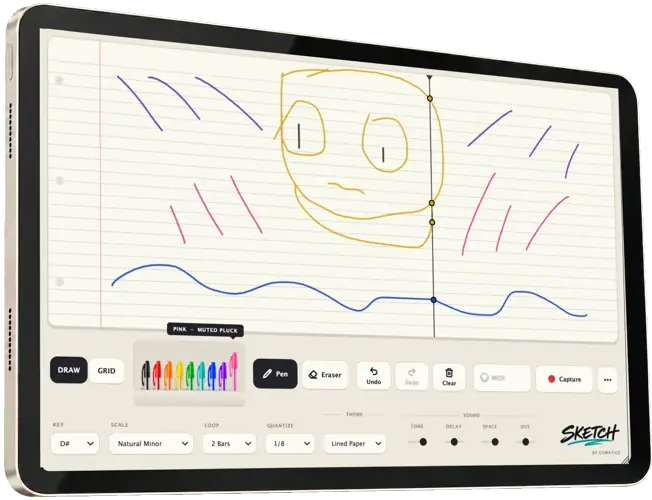
Enter SKETCH by Cymatics. Instead of clicking little gray rectangles on a grid, this tool lets you literally draw your melodies using colored pens, turning your visual motion directly into sound.
Why SKETCH is a Game-Changer for Your Mix & Workflow
SKETCH bypasses the typical technical hurdles of MIDI writing by prioritizing visual flow and instant gratification. Here is how it levels up your production:
- Instant Beat – Block Breaker: Think in shapes, curves, and motion rather than individual notes to discover weird, unexpected top – lines you would never normally program.
- Locked – In Harmony: Pick your project’s root key and scale beforehand, ensuring every line or doodle you draw stays musical and never clashes with your 808s or chords.
- Multi – Voice Layering With Colors: Each colored pen triggers a different preset sound, allowing you to sketch counter – melodies and layered textures on a single canvas.
- Pocket Control: Switch between grid mode for tight, quantized bounce or freehand mode for unquantized, humanized swing that breathes.
- Frictionless Editing: Undo, clear, or erase isolated sections on the fly so you can reshape your hooks without interrupting playback.
⚡ Pro Producer Tip: Resample Your Doodles
Draw a fast, high – register squiggle pattern in SKETCH, route it to an audio track, and print it. Next, pitch it down 12 semitones and slap a halftime effect on it. Visual doodles turn into moody, vintage sample textures that sit deep in the mix with plenty of headroom for your drums.
Tech Specs (Keep it Light)
- Platforms: Windows & macOS compatible
- Download Size: A featherweight 61 MB (zero strain on your hard drive)
- Controls: Key/scale selector, loop length, quantization toggle, multi – color sound palette, undo/erase functions
- Format: VST / AU host compatible
The Verdict
SKETCH is not trying to replace your deep synth workstations, and that is exactly why it slaps. It is an idea starter designed to take the friction out of songwriting. At just 61 MB, it opens lightning fast, leaves plenty of CPU for your heavy mix chains, and delivers raw creative spark when you hit a wall.


Cymatics.Sketch.1.0.1 ( 61 MB )
Let me know in the comments how this sits in your latest project! Are you using SKETCH to write wild trap melodies or for ambient sound design? Let’s talk shop below! 👇

We’re audio producers and sound designers with over 20 years of experience in the industry. Our team has lived through the entire evolution of digital audio production.
Our mission? To filter out the junk and bring you only the studio-ready free VSTs that actually compete with paid gear. We do the digging so you can focus on creating.
Recent Posts
Cozy Piano – Lo-Fi Upright VST
Tired of sterile, overly polished grand piano libraries that hog all your headroom and sound like a corporate commercial? I…
magic.METER – Vocal Analyzer
Tired of guessing why your lead vocal just won't sit in the pocket like a Billboard smash? We have all…
MS2000R Emulator – VA Synth
I've been digging through the web and found something special for your arsenal today, fam. We have all been stuck…
CA-72 – Analog Synth VST
I've been digging through the web and found something special for your arsenal today. Let's keep it real: how many…
X-Or – Free Bass Synth
Tired of your low end feeling thin, cluttered, or fighting your kick for headroom? I found a fix that hits…
TagoClip – Soft Clipper VST
If you have ever bounced from FL Studio over to Ableton, Logic, or Reaper, you know the exact heartbreak I…