S Doubler v1.0.0 WiN MAC

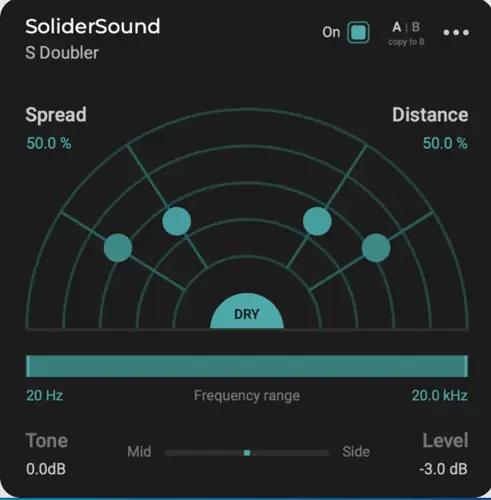
S Doubler v1.0.0 WiN MAC
25 MB
S Doubler effortlessly adds width and depth to your vocal and instrument tracks.
It replicates the psycho-acoustic effects of sound proximity to create a true sense of dimension in your mix. Place the four doubling voices on a virtual sound stage and craft the stereo image of your music.
Fast, and effective
Whether you’re looking to create subtle enhancements or bold stereo effects, S Doubler offers the flexibility to tailor the sound to your exact specifications.
Whether you’re working on a vocal track that needs extra presence and depth or looking to add dimension to your instrumental arrangements, S Doubler provides the tools you need to take your mixes to the next level. With its innovative features and intuitive design, it’s an essential addition to any producer or engineer’s toolkit.
Use Cases
Add thickness and width to individual tracks or entire mixes.
Add richness and presence to your vocals.
Enhance your guitars, synth, or keyboard sounds’ presence and make them sound more expansive.
Create stereo signals from mono sound sources.
Simulate the sound of chorus and ensemble effects.
Enhance the overall live performance sound and make it more engaging for the listener.
Features
Spread
It Controls the overall stereo width of the doubling effect. Higher “Spread” values result in wider panning and stronger variation between the doubler voices.
Distance
It controls the perceived proximity of the doubler voices. S Doubler models a number of physical effects to simulate a realistic sense of depth.
Enable Dry Signal
Mute the original audio for using S Doubler on a send. When dry signal output is enabled, S Doubler applies transient-based ducking to the doubler voices.
Tone
This parameter controls a tilt EQ applied to the doubler voices and allows to shape their character.
Frequency Range
It limits the doubling effect to the desired range. You can use the control to focus the stereo widening effect of S Doubler on just the part of the track.
Level
The ‘Level’ parameter controls the volume of the doubler voices, while keeping the original signal unaffected.
Built-in On/off
The built-in on and off switch in the plugin is specially useful for automation process, for avoiding any clicks in the sound.
Undo/redo
Undo and Redo options are built inside the plugin so you no longer need to worry about losing setting values.
Mid/Side Processing
Balance the effect of the plug-in between the mid and the side frequencies of your stereo tracks.
Scalable GUI
The GUI scale may range from 80% to 150%, making the plugin display nicely on any monitor screen sizes.
System Requirements
Operating Systems
Windows: Windows 7 and Up
Mac: macOS High Sierra (10.13) and Up.
Intel, M1 & M2 chip
Plugin Formats
VST, VST3, AU, and AAX
32-bit and 64-bit
https://solidersound.com/plugins/s-doubler/


S_Doubler-v1.0.0 ( 25 MB )

We’re audio producers and sound designers with over 20 years of experience in the industry. Our team has lived through the entire evolution of digital audio production.
Our mission? To filter out the junk and bring you only the studio-ready free VSTs that actually compete with paid gear. We do the digging so you can focus on creating.
Recent Posts
Relic – 13 Analog Plugins
Tired of your in-the-box mixes sounding flat, sterile, and cold? We have all been there - you stack clean digital…
StereoiXer – Spatial Processor
Are your mixes sounding flat, boxed-in, and totally lifeless? I found a fix. We have all been there in the…
StemDeck – AI Stem Splitter
We've all been there: you stumble across an absolute grail of a sample, but the kick is clashing hard with…
DiodeCrush – Crush Compressor
Are your drums sounding a little too polite and thin? We've all hit that wall where standard digital compressors keep…
Focus – Stereo Bus Utility
Tired of your mix sounding wide in your headphones, but the second you test it in the car or on…
The Usual Suspects – Plugin Manager
What's good fam! Nothing kills the studio vibe faster than sitting down to cook up, opening your DAW, and realizing…