RazorClip – Analog Clipper

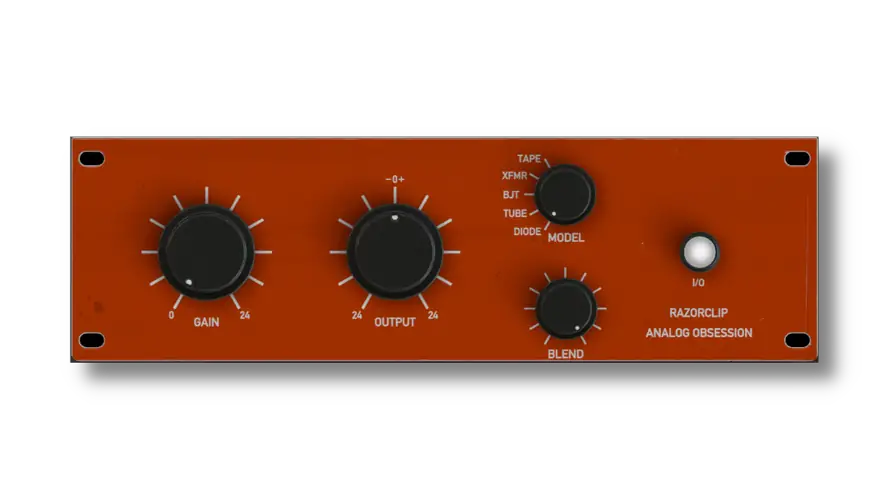
I’ve been digging through the deepest corners of the web looking for something to spice up my drum bus, and I just stumbled upon this gem today. It’s called RazorClip by Analog Obsession, and honestly? It’s straight fire.
We’ve all been there – you spend hours tweaking a synth or a snare, but it just sounds… cold. Sterile. You crank the volume, but it just eats up your headroom without actually sounding bigger.
The struggle to get that “expensive” console sound inside the box is real. That’s exactly where RazorClip steps in to save the day, adding that grit and weight your tracks are missing.
Why RazorClip is a Game-Changer for Your Mix & Workflow
This isn’t just a basic clipper; it’s a vibe machine. While most clippers give you one flavor of distortion, RazorClip offers a buffet. Here is why this plugin needs to sit in your plugin folder immediately:
- Versatile Flavor Palette: With 5 different analog models (Tape, XFMR, BJT, Tube, and Diode), you aren’t stuck with one sound. You can go from subtle warmth to aggressive crunch instantly.
- Automatic Gain Staging: The Gain knob comes with 24dB of gain compensation. This means you can drive the input hard to get that saturation sauce without blowing your speakers or tricking your ears with volume jumps.
- Perfect Parallel Processing: The built-in Blend knob lets you crush the signal and then dial it back, mixing the wet and dry signals so you keep your transients punchy while adding body.
- Ideal Analog Modeling: Instead of emulating one specific piece of vintage gear, these are “ideal” circuit models. You get the best characteristics of Transformer or Tube saturation without the noise or hassle of specific hardware limitations.
- Total Control: With a +/- 24dB Output knob, you have complete control over how the signal hits the next plugin in your chain, keeping your gain staging clean.
⚡ Pro Producer Tip: Warm Up Those Serum Patches
If your wavetable soft synths are sounding too “digital” or sharp, slap RazorClip on the bus and switch it to XFMR (Transformer) mode. Drive the input just until you see the needle move. This specific mode flattens the waveform gently, shaving off those harsh digital peaks and making the synth sit perfectly in the mix without EQ.
Tech Specs (Keep it Light)
- Name: RazorClip v1.0
- Developer: Analog Obsession
- Size: 31.8 MB
- Compatibility: Windows & Mac
- Key Features: 5 Clipping Modes, Oversampling, Resizable GUI.
The Verdict
RazorClip is a must-have for producers who want analog character without spending a dime. Whether you need the soft saturation of the XFMR mode for your keys or the harder edge of the BJT (transistor) mode to make your 808s cut through on small speakers, this plugin delivers. It’s lightweight, easy to use, and honestly, it slaps harder than some paid plugins I own. Download it, turn knobs, and trust your ears.


RazorClip.1.0 ( 32 MB )
Let me know in the comments how this sits in your latest project! Which of the 5 modes are you vibing with the most on your drums? Let’s talk shop below! 👇

We’re audio producers and sound designers with over 20 years of experience in the industry. Our team has lived through the entire evolution of digital audio production.
Our mission? To filter out the junk and bring you only the studio-ready free VSTs that actually compete with paid gear. We do the digging so you can focus on creating.
Recent Posts
Cozy Piano – Lo-Fi Upright VST
Tired of sterile, overly polished grand piano libraries that hog all your headroom and sound like a corporate commercial? I…
magic.METER – Vocal Analyzer
Tired of guessing why your lead vocal just won't sit in the pocket like a Billboard smash? We have all…
MS2000R Emulator – VA Synth
I've been digging through the web and found something special for your arsenal today, fam. We have all been stuck…
CA-72 – Analog Synth VST
I've been digging through the web and found something special for your arsenal today. Let's keep it real: how many…
X-Or – Free Bass Synth
Tired of your low end feeling thin, cluttered, or fighting your kick for headroom? I found a fix that hits…
TagoClip – Soft Clipper VST
If you have ever bounced from FL Studio over to Ableton, Logic, or Reaper, you know the exact heartbreak I…