QRange

QRange
size 2.6 MB / 2.9 MB / 9 MB / 4.3 MB
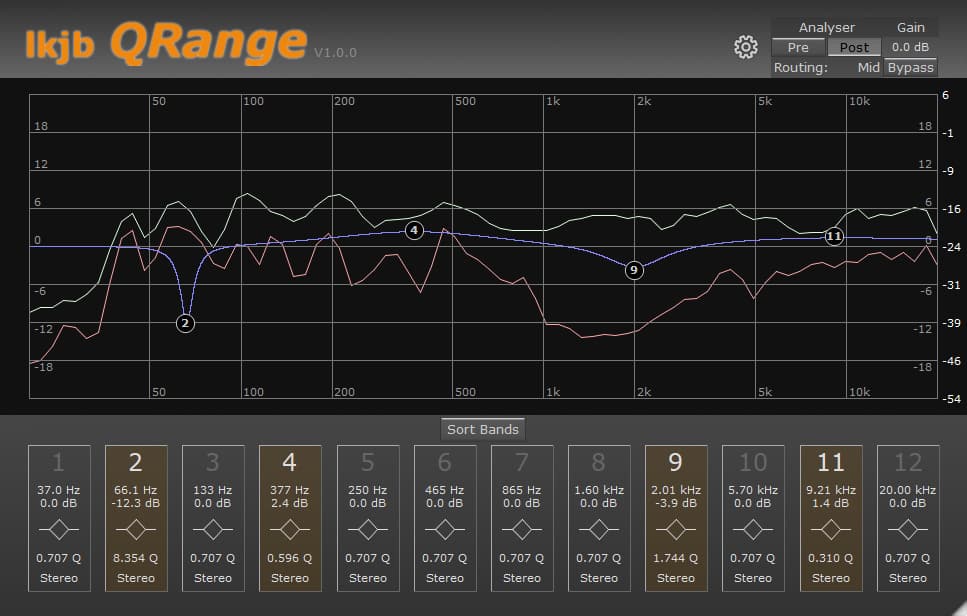
QRange is a IIR linear phase EQ.
The analyser can be set to analyse pre-EQ and post-EQ signal applying the same routings that are available per band. It is possible to adjust the analyser minimum/maximum magnitude by dragging the scale on the right (visible only if the analyser is active).
- 12 bands (sortable by frequency).
- Each band can be used as peak, shelf and cut filter.
- Cut filters are available with 12, 24 and 48 dB/oct steepness.
- Stereo/Left/Right/Mid/Side routing per band.
- Global gain for loudness adjustments.
- Resizable user interface.
A menu which is available via the gearwheel provides:
- Adjusting Analyser Range.
- Adjusting frequency display magnitude.
- Adjusting the plugin latency.
- Setting a default EQ state and/or user interface size for new instances.
https://code.google.com/archive/p/lkjb-plugins


lkjb_QRange ( 2.6 MB )
lkjb_QRange_x64 ( 2.9 MB )
lkjb_QRange_MacVST ( 9 MB )
lkjb_QRange_MacAU ( 4.3 MB )

We’re audio producers and sound designers with over 20 years of experience in the industry. Our team has lived through the entire evolution of digital audio production.
Our mission? To filter out the junk and bring you only the studio-ready free VSTs that actually compete with paid gear. We do the digging so you can focus on creating.
Recent Posts
DearVR Mix-SE – Virtual Mix Room
Tired of your mixes sounding fire in your headphones but completely falling apart the second you play them in the…
Waveform Compressor – Visual Comp
Are your mixes sounding lifeless because you're over-compressing blind? I found a fix. We’ve all been there—squashing the life out…
YS Compressor 2025 – Mixing Comp
Are your mixes sounding thin and sterile? I found a fix. You know the struggle - you’re trying to get…
Spl4sh 4 – Free Synth VST
Are your Future House leads sounding a little thin and lifeless? I found a fix. As a producer, one of…
VoxRelief Lite – Vocal Fixer
Tired of muddy, boxy vocals ruining your mix? I found a fix. We’ve all been there in the studio: you…
HLF-3C – Passive EQ Filter
Tired of your instrument busses sounding like a muddy, cluttered mess? I found a fix. There is nothing worse than…