PINCH – Motion Controller VST

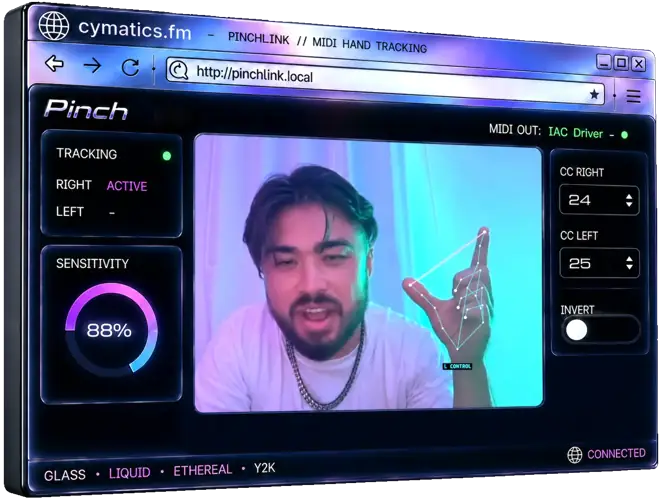
I’ve been digging through the web and found something special for your arsenal. Let’s be real for a second – click-and-drag mouse automation is a total buzzkill. Drawing endless points on an automation lane just to get a filter sweep or transition to feel right takes forever, and half the time it still sounds stiff and mechanical.
You lose all that natural bounce while trying to tweak a single knob. That studio struggle ends today, because PINCH brings pure human motion back into your DAW setup.
Why PINCH is a Game-Changer for Your Mix & Workflow
- Hands-On Expressiveness: Ditch the tedious mouse clicks and perform your automation live using your hands through any standard webcam.
- Instant Instinctive Control: Shape filters, macros, and crazy FX transitions with simple pinch gestures that catch every bit of emotion and instinct in your performance.
- Dual-Hand Flexibility: Route parameters to your left hand, right hand, or both hands to pull off complex modulation moves that sit perfectly in the mix.
- Universal DAW Mapping: Easily link PINCH’s control output to virtually any automatable parameter or plugin inside your session.
⚡ Pro Producer Tip: Live Build-Up Filter Sweeps
Route PINCH to a low-pass filter on your drum or synth bus right before a drop. Perform the filter movement with your hand in real time to capture subtle human timing variations – it gives your build-ups an organic energy boost that static drawn automation simply cannot match.
Tech Specs (Keep it Light)
- Platforms: Windows & Mac (VST)
- File Size: 21.91 MB (Windows) / 126.99 MB (Mac)
- Hardware Needed: Any standard internal or USB webcam
- Tracking Features: Real-time motion tracking, customizable sensitivity, axis inversion, dual-hand support
The Verdict
PINCH takes automation out of the grid and puts it back into your hands. If your tracks are lacking human touch or your transitions feel static, this tool brings back that true performance vibe without needing expensive MIDI hardware controllers. It slaps, it saves time, and it makes mixing fun again.


Cymatics.Pinch.1.2.6-1.2.5 ( 126 MB )
Let me know in the comments how this sits in your latest project! Are you using PINCH for crazy filter sweeps or wild delay throw automation? Let’s talk shop below! 👇

We’re audio producers and sound designers with over 20 years of experience in the industry. Our team has lived through the entire evolution of digital audio production.
Our mission? To filter out the junk and bring you only the studio-ready free VSTs that actually compete with paid gear. We do the digging so you can focus on creating.
Recent Posts
Lega Effect – Voice FX Plugin
Tired of stacking half a dozen stock plugins just to get that gritty vintage vocal texture? We have all been…
Omni Delay – Multi-FX Delay
Tired of stacking four or five different delay plugins just to find the right bounce for your track? We have…
Delay Lama 2 – Vowel Synth
What's good fam. Let’s keep it 100 for a second - how many studio sessions have you wasted scrolling through…
Multi Chorus – Free Chorus VST
Tired of your dry synth leads sounding flat, or your guitars getting totally buried when you try to spread them…
Fire – Multiband Distortion
Are your mixes sounding thin and washed out? Tired of dialed - in saturation turning your heavy kicks and 808s…
CompGate – 7-in-1 Dynamics Strip
Tired of loading five different dynamic plugins just to test which flavor fits your track? We've all been there -…