Phantom Ghost Reverb – Transition FX

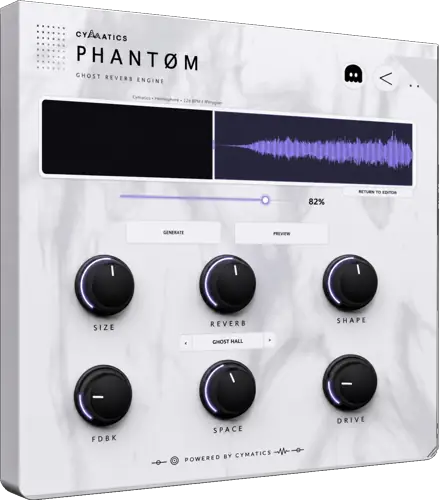
Tired of spending ten minutes chopping, bouncing, and realigning audio just to get a simple reverse swell? I found a fix.
We all know that classic reverse reverb transition slaps – it builds instant tension right before the drop and pulls the listener straight into the hook. But let’s be real: doing it manually is a total vibe killer. By the time you duplicate your vocal lead, flip it backwards, dial in a 100% wet reverb, render the stem, flip it back, and nudge the transient so it sits in the pocket, your creative spark is long gone.
Enter Phantom Ghost Reverb. This slick 35 MB utility plugin takes all that tedious manual labor and automates the entire process in seconds, letting you stay locked into your production flow.
Why Phantom Ghost Reverb is a Game-Changer for Your Mix & Workflow
Instead of setting up crazy routing chains or freezing tracks, Phantom streamlines the entire sweep design into a clean, drag – and – drop sandbox. You get all the sauce of a custom reverse swell without ever touching a bounce menu.
Here is how it levels up your beatmaking arsenal:
- Instant Drag – and – Drop Workflow: Throw in any vocal chop, snare hit, or synth stab, and the plugin spits out an instant, silky reversed tail ready for action.
- Intuitive Macro Tone Shaping: Dial in dedicated controls for space, texture, tone, and width so your riser cuts through the mix without eating up your headroom.
- Direct DAW Integration: Once you sculpt the sound to your taste, drag the rendered audio straight onto your timeline and keep moving.
- Keeps Sessions Lightweight: Because you pull the processed sweep out as pure audio, your DAW isn’t bogged down by heavy reverb tails chewing up your CPU.
⚡ Pro Producer Tip: The Pre – Drop Vocal Suck
Grab the very first syllable of your hook’s lead vocal and drop it into Phantom. Crank the width macro out wide to create space down the center, high-pass the sweep around 180 Hz to clear mud, and tuck the tail right up against bar one. It creates a vacuum effect that pulls the listener’s ear in right before the 808 smacks them in the chest.
Tech Specs (Keep it Light)
- Operating System: Windows & macOS
- Download Size: 35 MB
- Core Feature: Automated Reverse Reverb Engine
- Output: Direct Drag – and – Drop Audio Export to DAW
The Verdict
At the end of the day, speed is everything when inspiration hits. Phantom Ghost Reverb isn’t just another space plugin – it is a dedicated workflow accelerator that turns a tedious production chore into a two – second drag – and – drop gesture. If your transitions have been feeling flat or taking too long to build, throw this into your toolkit immediately.


Phantom.0.5.4-0.5.5 ( 35 MB )
Let me know in the comments how this sits in your latest project! Are you using this mostly on vocal hooks or drum fills? Let’s talk shop below! 👇

We’re audio producers and sound designers with over 20 years of experience in the industry. Our team has lived through the entire evolution of digital audio production.
Our mission? To filter out the junk and bring you only the studio-ready free VSTs that actually compete with paid gear. We do the digging so you can focus on creating.
Recent Posts
True Panner – 3D Stereo Imager
Tired of your mixes sounding two-dimensional and cluttered right down the middle? I found a fix that is going to…
Polarity-Recorder – Audio Capture
Tired of playing the most fire synth lead of your life, only to look over and realize your DAW wasn't…
Harmony Pro – Chord Assistant
Tired of laying down the same tired four-bar chord loop on every single track? We have all been there, staring…
Ensoniq EPS-16 Plus – Sampler VST
We all know the real struggle when cooking up inside the box - modern digital samplers are just way too…
Gamma – Harmonic Resonator
I've been digging through the web and found something special for your arsenal today. We’ve all been there: you drop…
Chili Clipper – Soft Clipper VST
We’ve all been there - you’re working on a banger, the groove is locked, but the moment you try to…