Phantom Ghost Reverb – Transition FX

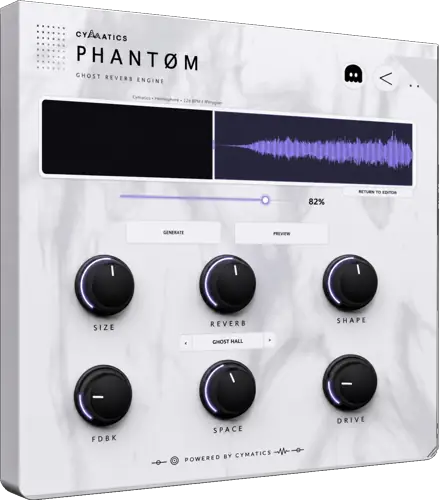
Tired of spending ten minutes chopping, bouncing, and realigning audio just to get a simple reverse swell? I found a fix.
We all know that classic reverse reverb transition slaps – it builds instant tension right before the drop and pulls the listener straight into the hook. But let’s be real: doing it manually is a total vibe killer. By the time you duplicate your vocal lead, flip it backwards, dial in a 100% wet reverb, render the stem, flip it back, and nudge the transient so it sits in the pocket, your creative spark is long gone.
Enter Phantom Ghost Reverb. This slick 35 MB utility plugin takes all that tedious manual labor and automates the entire process in seconds, letting you stay locked into your production flow.
Why Phantom Ghost Reverb is a Game-Changer for Your Mix & Workflow
Instead of setting up crazy routing chains or freezing tracks, Phantom streamlines the entire sweep design into a clean, drag – and – drop sandbox. You get all the sauce of a custom reverse swell without ever touching a bounce menu.
Here is how it levels up your beatmaking arsenal:
- Instant Drag – and – Drop Workflow: Throw in any vocal chop, snare hit, or synth stab, and the plugin spits out an instant, silky reversed tail ready for action.
- Intuitive Macro Tone Shaping: Dial in dedicated controls for space, texture, tone, and width so your riser cuts through the mix without eating up your headroom.
- Direct DAW Integration: Once you sculpt the sound to your taste, drag the rendered audio straight onto your timeline and keep moving.
- Keeps Sessions Lightweight: Because you pull the processed sweep out as pure audio, your DAW isn’t bogged down by heavy reverb tails chewing up your CPU.
⚡ Pro Producer Tip: The Pre – Drop Vocal Suck
Grab the very first syllable of your hook’s lead vocal and drop it into Phantom. Crank the width macro out wide to create space down the center, high-pass the sweep around 180 Hz to clear mud, and tuck the tail right up against bar one. It creates a vacuum effect that pulls the listener’s ear in right before the 808 smacks them in the chest.
Tech Specs (Keep it Light)
- Operating System: Windows & macOS
- Download Size: 35 MB
- Core Feature: Automated Reverse Reverb Engine
- Output: Direct Drag – and – Drop Audio Export to DAW
The Verdict
At the end of the day, speed is everything when inspiration hits. Phantom Ghost Reverb isn’t just another space plugin – it is a dedicated workflow accelerator that turns a tedious production chore into a two – second drag – and – drop gesture. If your transitions have been feeling flat or taking too long to build, throw this into your toolkit immediately.


Phantom.0.5.4-0.5.5 ( 35 MB )
Let me know in the comments how this sits in your latest project! Are you using this mostly on vocal hooks or drum fills? Let’s talk shop below! 👇

We’re audio producers and sound designers with over 20 years of experience in the industry. Our team has lived through the entire evolution of digital audio production.
Our mission? To filter out the junk and bring you only the studio-ready free VSTs that actually compete with paid gear. We do the digging so you can focus on creating.
Recent Posts
Room Service – Plate Reverb
Tired of free reverb plugins turning your lead vocals into a washed-out, muddy mess? We've all been there. You want…
Bit Layer – Multi-Band Crusher
Tired of traditional bitcrushers completely wrecking your punch and turning your low end into pure digital mud? We've all been…
RMSC – Ring Mod Sidechain
Tired of your kick and 808 fighting for low - end real estate? I found a wild fix today. We’ve…
PortaTwin – Cassette Strip
Are your mixes sounding thin and way too sterile? I feel your pain. In modern in-the-box production, clean digital recording…
UnClip – Clip Restorer
Ever had an artist send over an insane vocal take, only to zoom in and see the waveform completely pinned…
Audio Quick Actions – Mac Audio Suite
Tired of firing up a CPU-heavy DAW session just to check a sample's key or see if your two-track bounce…