Osci Render v2.2.1 Win Mac Linux

Osci Render v2.2.1 Win Mac Linux
FREE | Win Mac Linux | 31 MB
Osci Render is A synthesizer audio plugin for making music by drawing objects, text, videos, and images on an oscilloscope. Open-source synthesizer for making music by drawing objects, text, and images on an oscilloscope using audio. Allows for 3D rendering of .obj files, .svg images, .txt files, and Blender scenes on Windows, macOS, and Linux.
Everything is controllable from a Digital Audio Workstation (DAW), allowing for parameter automation and MIDI control. If you prefer to use osci-render as a standalone application, you can do that too! Osci-render is a fully programmable synthesiser, allowing for custom visuals, sounds, and audio effects to be scripted using Lua, and interacted with using your DAW.
Current Features:
Render 3D objects
Render SVG vector images
Render text
Scriptable visuals and audio effects using Lua
Blender integration
Software oscilloscope
Applying image effects
Bit Crush
Vertical/Horizontal Distortion
Image Wobble
Image Smoothing
Image Tracing
… and more!
MIDI control
Automate parameters from a DAW
Saving and loading projects
Installation:
Standalone Application:
Run the osci-render.exe file on Windows, the osci-render.app file on macOS, or osci-render executable on Linux. You may need to allow the application to run if you get a warning.
Details on how to bypass security warnings or ‘app is damaged’ warnings on macOS can be found here.
VST Plugin:
Copy the osci-render.vst3 file to your VST plugins folder, and restart your DAW. This is usually located at: C:\Program Files\Common Files\VST3 on Windows, or /Library/Audio/Plug-Ins/VST3 on macOS.
AudioUnit (AU) Plugin:
Copy the osci-render.component file to your AU plugins folder, and restart your DAW. This is usually located at: /Library/Audio/Plug-Ins/Components on macOS.
Getting Started:
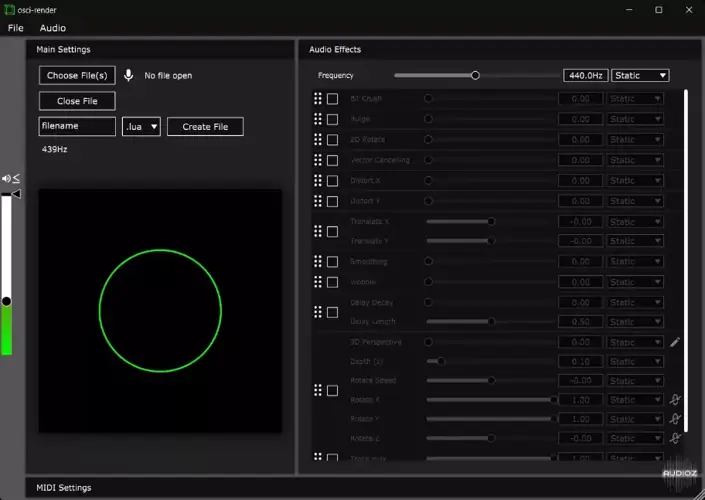
Run the application, or add the plugin to your DAW. You should see the below interface, and hear a sine wave playing, and a circle being drawn on the software oscilloscope.


Osci_Render_2.2.1 ( 31 MB )

We’re audio producers and sound designers with over 20 years of experience in the industry. Our team has lived through the entire evolution of digital audio production.
Our mission? To filter out the junk and bring you only the studio-ready free VSTs that actually compete with paid gear. We do the digging so you can focus on creating.
Recent Posts
DearVR Mix-SE – Virtual Mix Room
Tired of your mixes sounding fire in your headphones but completely falling apart the second you play them in the…
Waveform Compressor – Visual Comp
Are your mixes sounding lifeless because you're over-compressing blind? I found a fix. We’ve all been there—squashing the life out…
YS Compressor 2025 – Mixing Comp
Are your mixes sounding thin and sterile? I found a fix. You know the struggle - you’re trying to get…
Spl4sh 4 – Free Synth VST
Are your Future House leads sounding a little thin and lifeless? I found a fix. As a producer, one of…
VoxRelief Lite – Vocal Fixer
Tired of muddy, boxy vocals ruining your mix? I found a fix. We’ve all been there in the studio: you…
HLF-3C – Passive EQ Filter
Tired of your instrument busses sounding like a muddy, cluttered mess? I found a fix. There is nothing worse than…