Nebudestru (Sound Destruction Unit) v1.0 Win Mac

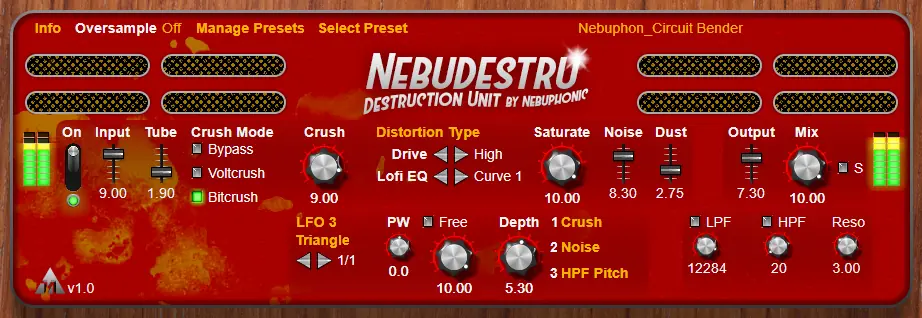
Nebudestru Win Mac
11.4 MB
Distortion, Saturation, Bitcrusher, Voltage Quantizer, Noise Generator, Lofi, Filters, Glitch.
Free Audio Software Effect Plugin (VST3/AU Windows/Mac)
Features:
Oversample
Off, 2x, 4x, or 8x oversampling.
Presets
Comes bundled with 25 presets by Nebuphon and Creature. Create your own!
Input
Increase or decrease the input signal.
Tube
Tube style saturation.
Voltcrush
Voltage quantizer, a unique effect similar to bitcrushing.
Bitcrush
Bitcrusher, reduces resolution of audio signal.
Distortion
Tubular, Tape, Square, Cube, Wavefold, Piecewise, or Rectify.
Low, Medium, or High drive.
Lofi EQ
5 preset equalizer curves to degrade clarity.
Saturate
A powerful saturator.
Noise
Generates vinyl-esque noise, gated to input signal and filtered to avoid rumble.
Dust
Makes noise generator sharper and more crackly.
LFOs
3 LFOs with free rates, 34 sync rates including dotted and triplet, and adjustable depth.
Sine, Saw, Ramp, Triangle, or Pulse with adjustable Pulse Width.
Crush, Saturate, Noise, Dust, Mix, LPF pitch, HPF pitch, or filters resonance destinations.
Output
Increase or decrease the output signal.
Lowpass Filter/Highpass Filter
Clean up frequency range of output signal, or increase resonance for dramatic effects.
Stereo/Mono
Easily switch between stereo and mono signal output.
Mix
Mix between input signal (dry) and output signal (wet).
Version 1.0
Minimum System Requirements:
Windows 8.1 or later/macOS 10.9 or later (Intel/SIlicon).
VST3/AU 64bit Compatible DAW
Installation Issue?
1. Your internet browser, antivirus, Windows, or macOS may incorrectly flag the contents of this installer as a “virus”; or as from an “unknown developer”. In this case, please bypass it by following these directions: Windows, macOS.
2. If you can’t find the install locations in macOS, you may need to “show hidden files”. Just navigate as close as you can, then press Command+Shift+.
3. If the plugin isn’t appearing in your DAWs list, you must rescan plugins in your DAW. Search online for “how to rescan plugins (DAW name: Cubase, Ableton Live, etc.)”.
4. If your DAW lists plugin by manufacturer, it will be under “Nebuphonic”.
5. If presets don’t appear in the plugin: Click “Manage Presets” > “Load Bank”. Then, navigate to where you installed the “Nebuphonic” presets folder, open it and click “nebudestru_bundled.xmlbank”


Nebudestru v1,0 Installer ( 11 MB )

We’re audio producers and sound designers with over 20 years of experience in the industry. Our team has lived through the entire evolution of digital audio production.
Our mission? To filter out the junk and bring you only the studio-ready free VSTs that actually compete with paid gear. We do the digging so you can focus on creating.
Recent Posts
Paradigm Lite – Vintage Synth VST
What's good fam! If you've been cooking up in the box lately, you know the daily studio struggle: you lay…
The Final Master – Smart Mastering
Tired of your mixes sounding quiet, thin, or completely squashed when you try to master them yourself? I found a…
Wave Emulation – Wavetable Synth
I've been digging through the web and found something special for your arsenal. Let's keep it 100 - so many…
MANTIS Lite – Distortion Plugin
Tired of digital distortion plugins that sound stiff, fizzy, and completely rob your drums of their punch? We have all…
Stereo Unlimited – Stereo Widener
Tired of your synths and background vocals fighting for space dead in the center? We have all been there -…
CY-FAN Lite – Creative Modulation
Are your synth chords and guitar tracks feeling completely flat and lifeless in the DAW? I found a fix. We…