nClear Sibalance – Vocal De-Esser

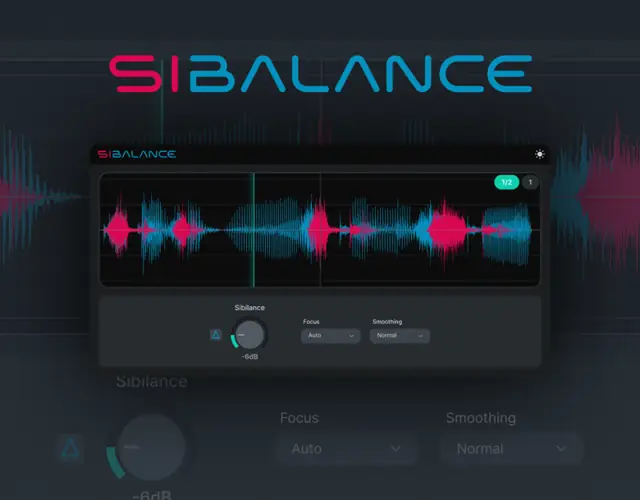
Tired of those harsh vocal takes piercing your eardrums? I found a fix.
There is nothing worse in the studio than getting a vocal take that absolutely slaps in the pocket, only to realize the “s” and “sh” consonants are slicing through your studio monitors like daggers.
You try to EQ it out, but dropping a massive bell curve on the high-end just makes the whole track sound like it was recorded under a heavy blanket. The air is gone, the presence is dead, and you just ruined the vibe trying to fix a few aggressive syllables.
Enter nClear Sibalance
Why nClear Sibalance is a Game-Changer for Your Mix & Workflow
This isn’t your daddy’s heavy-handed compressor. This plugin acts as a precision sibilance shaper that actually listens to what’s happening in the audio file. Here is why it belongs in your toolkit:
- Smart Energy Detection: It listens strictly for sibilance-like energy and only triggers reduction when those harsh spikes happen. The rest of your vocal stays untouched, keeping all that crisp high-end presence and headroom you worked so hard to get.
- Delta Monitoring: No more shooting in the dark! The Delta feature lets you solo out exactly what the plugin is removing. If it sounds like a snake hissing, you’re doing it right.
- Vocal Smoothing: It effortlessly tames aggressive consonants and overly bright vocal recordings, ensuring the vocals sit glued in the mix instead of jumping out and startling the listener.
⚡ Pro Producer Tip: Master the Delta Button
Always start your tweaking in Delta monitoring mode. Push your threshold until you hear ONLY the harsh “s” and “sh” sounds being spat back at you. If you start hearing the actual tone, words, or body of the vocal bleeding into the Delta signal, you’ve gone too far and are flattening the take. Dial it back until it’s just pure hiss, turn Delta off, and boom—perfect vocals.
Tech Specs (Keep it Light)
We love a lightweight plugin that doesn’t eat up our CPU when we’ve got 50+ tracks loaded up. nClear Sibalance is super lean:
- Size: A ridiculously tiny 16 MB. It installs in seconds.
- Compatibility: Available for both WiN and MAC users, so no matter what OS you’re cooking up beats on, you’re fully covered.
The Verdict
Finding a good free de-esser that doesn’t completely murder the tone of a lead vocal is rare. nClear Sibalance does exactly what it says on the tin: it clears up the harshness, preserves the original recording’s soul, and gets out of the way. If you want your vocals to sound expensive, smooth, and radio-ready, this is an absolute must-download for the plugin folder.


Sibalance.1.0.0 ( 16 MB )
Let me know in the comments how this sits in your latest project! Are you throwing this straight on your lead vocal chain or using it to tame your background stacks? Let’s talk shop below! 👇

We’re audio producers and sound designers with over 20 years of experience in the industry. Our team has lived through the entire evolution of digital audio production.
Our mission? To filter out the junk and bring you only the studio-ready free VSTs that actually compete with paid gear. We do the digging so you can focus on creating.
Recent Posts
Paradigm Lite – Vintage Synth VST
What's good fam! If you've been cooking up in the box lately, you know the daily studio struggle: you lay…
The Final Master – Smart Mastering
Tired of your mixes sounding quiet, thin, or completely squashed when you try to master them yourself? I found a…
Wave Emulation – Wavetable Synth
I've been digging through the web and found something special for your arsenal. Let's keep it 100 - so many…
MANTIS Lite – Distortion Plugin
Tired of digital distortion plugins that sound stiff, fizzy, and completely rob your drums of their punch? We have all…
Stereo Unlimited – Stereo Widener
Tired of your synths and background vocals fighting for space dead in the center? We have all been there -…
CY-FAN Lite – Creative Modulation
Are your synth chords and guitar tracks feeling completely flat and lifeless in the DAW? I found a fix. We…