Mooper

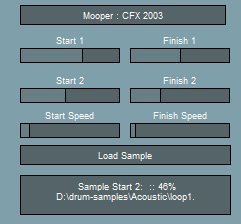
Mooper
size 0.66 MB
Mooper plays a sample where you can modulate the loop start and finish position by using 2 LFOs.
- Simplest way of using it is press load sample, load a sample.
- Select the first loop points using sample start / finish 1 and the second loop points using sample start / finish 2.
- Start speed controls the the start of the LFO which modulates between the first and second start loop points.
- Finish speed controls the the start of the LFO which modulates between the first and second finish loop points.
- if the current start loop position is after the current finish loop position then the sample plays backwards.
- Sliders – left button + move mouse, shift + left button – fine controls.


Mooper ( 0.66 MB )

We’re audio producers and sound designers with over 20 years of experience in the industry. Our team has lived through the entire evolution of digital audio production.
Our mission? To filter out the junk and bring you only the studio-ready free VSTs that actually compete with paid gear. We do the digging so you can focus on creating.
Recent Posts
Relic v0.4.1 WiN MAC LiNUX
Relic 552 / 950 / 681 MB Free collection of 13 analog-style plugins. Five compressors. Five EQs. Two tape machines.…
StereoiXer WiN macOS
StereoiXer 117 MB StereoiXer - More Depth, More Deep, More Wide... StereoiXer is a very special Multiband Spatial Image Processor.…
StemDeck v0.20 WiN MAC LiNUX
StemDeck 588 / 487 / 806 MB Stemdeck is an modern stem extraction platform for musicians,producers and hobbyists, designed to…
DiodeCrush v1.0 WiN MAC
DiodeCrush 49 MB Not the most versatile diode-bridge compressor! DiodeCrush is fully passive, heavy crush compressor with a lot of…
Focus v1.0.1 WiN macOS LiNUX
Focus 29 MB Goghini's Focus Frames are glasses whose side shields quiet the visual noise at the edges so your…
The Usual Suspects Plugin Manager v2.2.27
The Usual Suspects Plugin Manager 32 MB The usual suspects proudly presents their plugin manager, where you can keep an…