Mooper

Mooper
size 0.66 MB
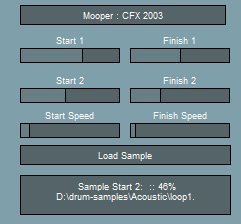
Mooper plays a sample where you can modulate the loop start and finish position by using 2 LFOs.
- Simplest way of using it is press load sample, load a sample.
- Select the first loop points using sample start / finish 1 and the second loop points using sample start / finish 2.
- Start speed controls the the start of the LFO which modulates between the first and second start loop points.
- Finish speed controls the the start of the LFO which modulates between the first and second finish loop points.
- if the current start loop position is after the current finish loop position then the sample plays backwards.
- Sliders – left button + move mouse, shift + left button – fine controls.


Mooper ( 0.66 MB )

We’re audio producers and sound designers with over 20 years of experience in the industry. Our team has lived through the entire evolution of digital audio production.
Our mission? To filter out the junk and bring you only the studio-ready free VSTs that actually compete with paid gear. We do the digging so you can focus on creating.
Recent Posts
YS Panning Room 3 – Spatial Mixing Tool
Ever feel like your mix is just a flat wall of sound? You’ve got the levels right, but everything is…
DynamicX – Custom Dynamics Tool
Tired of your compressors sounding too "pumpy" or just not grabbing the right transients the way you want? I found…
Big Max Zero – Pro Low Latency Limiter
Tired of your limiter adding massive delay when you’re trying to track vocals or play MIDI keys live? We’ve all…
YS Console AMP – Analog Console Sim
Are your mixes sounding a little too "inside the box"? That sterile, flat digital vibe can kill a session faster…
LUveler – Loudness & Dynamics VST
Tired of muddy dialogue or mixes that get totally squashed trying to hit modern streaming targets? I found a fix.…
LAEA – Free Optical Comp
Tired of your lead vocals jumping out of the mix one second and completely vanishing the next? Or maybe your…