Monster Toys (Musical Toys) v1.0 WiN MAC

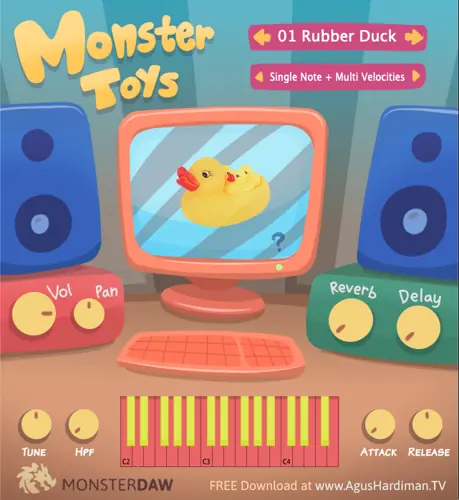
Monster Toys (Musical Toys)
293 MB
Are you ready to dive into a world of musical innovation? MONSTER TOYS is here to amplify your music-making journey like never before. Get ready to explore the realm of toy instruments in your music production, all in one fantastic plugin!
MONSTER Toys Features
20 (Twenty) musical toy instruments : Rubber Duck, Crocodile Glockenspiel, Latto-Latto, Music Box, Recorder, Toy Guns, Kids Pan Flute, Pianica, Otamatone, Kazoo, Toy Whistle, Marching Band Drums, Kids Accordion, Toy Keyboard, Kalimba Thumb Piano, Baby Trumpet, Toy Piano, Casio VL-1 Pocket Synth, Toy Reed, and Kids Harmonica.
Master Volume and Pan.
Master Tuning and High Pass filter.
Attack and Release of each presets.
Global Reverb and Delay.
Most of the plugin’s parameter is ready to automate.
Small file size and light on CPU / RAM.
Future preset updates.
Monster Toys Download Links and Installation Steps
Monster Toys is a free plugin available in Windows VST2/VST3 64-bit and Mac VST2/VST3/Audio Unit 64-bit formats.
There’s no installer so you have to put the file manually. Read and follow these steps:
If you use Windows and Cubase, Studio One, Ableton Live, Reaper, FL Studio, Reason, etc., put the .dll file to the VST2 folder OR the .vst3 file to the VST3 folder of your DAW (If you don’t know the location, google “VST folder location windows”).
If you use Mac and Cubase, Studio One, Ableton Live, Reaper, FL Studio, Reason, etc., put the .vst file to the VST2 folder OR the .vst3 file to the VST3 folder of your DAW (If you don’t know the location, googling “VST folder location mac”).
If you use GarageBand or Logic Pro, put the .component file in the Audio Unit folder of your DAW (If you don’t know the location, google “audio unit folder location mac”).
UnZip the ‘MONSTER Toys v1 Library.zip’ to your harddisk in any location. You can put this Library file on an external hard drive. Don’t change the folder structure of “MONSTER Toys v1 Library”.
Fire up your DAW and load the MONSTER Toys plugin and it will ask for the location of the sound library:
Choose the “MONSTER Toys v1 Library” which you have copied on step 4.
ENJOY the plugin!


MONSTER Toys v1 ( 293 MB )

We’re audio producers and sound designers with over 20 years of experience in the industry. Our team has lived through the entire evolution of digital audio production.
Our mission? To filter out the junk and bring you only the studio-ready free VSTs that actually compete with paid gear. We do the digging so you can focus on creating.
Recent Posts
Ensoniq EPS-16 Plus – Sampler VST
We all know the real struggle when cooking up inside the box - modern digital samplers are just way too…
Gamma – Harmonic Resonator
I've been digging through the web and found something special for your arsenal today. We’ve all been there: you drop…
Chili Clipper – Soft Clipper VST
We’ve all been there - you’re working on a banger, the groove is locked, but the moment you try to…
TONE3000 – Free NAM Amp Sim
Tired of digging through endless nested folders and downloading random files just to audition a decent guitar profile? We have…
DrumPod – Drum Loop Engine
Tired of staring at a blank sequencer waiting for drum bounce to hit? I found a fix. We have all…
Dream Cassette MAX – Tape Color VST
Tired of your tracks sounding sterile, flat, and way too digital? I found a fix. We’ve all fought that battle…