Monster Toys (Musical Toys) v1.0 WiN MAC

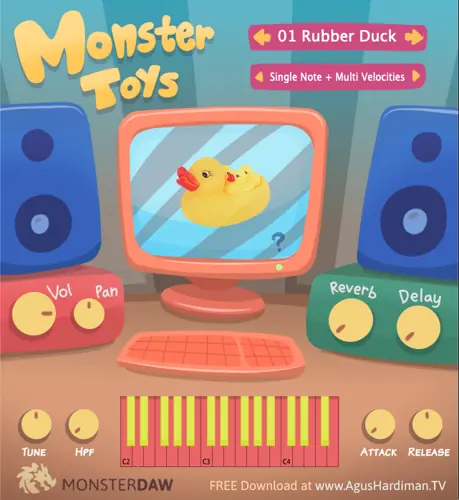
Monster Toys (Musical Toys)
293 MB
Are you ready to dive into a world of musical innovation? MONSTER TOYS is here to amplify your music-making journey like never before. Get ready to explore the realm of toy instruments in your music production, all in one fantastic plugin!
MONSTER Toys Features
20 (Twenty) musical toy instruments : Rubber Duck, Crocodile Glockenspiel, Latto-Latto, Music Box, Recorder, Toy Guns, Kids Pan Flute, Pianica, Otamatone, Kazoo, Toy Whistle, Marching Band Drums, Kids Accordion, Toy Keyboard, Kalimba Thumb Piano, Baby Trumpet, Toy Piano, Casio VL-1 Pocket Synth, Toy Reed, and Kids Harmonica.
Master Volume and Pan.
Master Tuning and High Pass filter.
Attack and Release of each presets.
Global Reverb and Delay.
Most of the plugin’s parameter is ready to automate.
Small file size and light on CPU / RAM.
Future preset updates.
Monster Toys Download Links and Installation Steps
Monster Toys is a free plugin available in Windows VST2/VST3 64-bit and Mac VST2/VST3/Audio Unit 64-bit formats.
There’s no installer so you have to put the file manually. Read and follow these steps:
If you use Windows and Cubase, Studio One, Ableton Live, Reaper, FL Studio, Reason, etc., put the .dll file to the VST2 folder OR the .vst3 file to the VST3 folder of your DAW (If you don’t know the location, google “VST folder location windows”).
If you use Mac and Cubase, Studio One, Ableton Live, Reaper, FL Studio, Reason, etc., put the .vst file to the VST2 folder OR the .vst3 file to the VST3 folder of your DAW (If you don’t know the location, googling “VST folder location mac”).
If you use GarageBand or Logic Pro, put the .component file in the Audio Unit folder of your DAW (If you don’t know the location, google “audio unit folder location mac”).
UnZip the ‘MONSTER Toys v1 Library.zip’ to your harddisk in any location. You can put this Library file on an external hard drive. Don’t change the folder structure of “MONSTER Toys v1 Library”.
Fire up your DAW and load the MONSTER Toys plugin and it will ask for the location of the sound library:
Choose the “MONSTER Toys v1 Library” which you have copied on step 4.
ENJOY the plugin!


MONSTER Toys v1 ( 293 MB )

We’re audio producers and sound designers with over 20 years of experience in the industry. Our team has lived through the entire evolution of digital audio production.
Our mission? To filter out the junk and bring you only the studio-ready free VSTs that actually compete with paid gear. We do the digging so you can focus on creating.
Recent Posts
Room Service – Plate Reverb
Tired of free reverb plugins turning your lead vocals into a washed-out, muddy mess? We've all been there. You want…
Bit Layer – Multi-Band Crusher
Tired of traditional bitcrushers completely wrecking your punch and turning your low end into pure digital mud? We've all been…
RMSC – Ring Mod Sidechain
Tired of your kick and 808 fighting for low - end real estate? I found a wild fix today. We’ve…
PortaTwin – Cassette Strip
Are your mixes sounding thin and way too sterile? I feel your pain. In modern in-the-box production, clean digital recording…
UnClip – Clip Restorer
Ever had an artist send over an insane vocal take, only to zoom in and see the waveform completely pinned…
Audio Quick Actions – Mac Audio Suite
Tired of firing up a CPU-heavy DAW session just to check a sample's key or see if your two-track bounce…