KlangFalter v1.0.0 Win Mac

KlangFalter v1.0.0 Win Mac
FREE | Win Mac VST3 AU | 9 MB
Convolution audio plugin (e.g. for usage as convolution reverb)
KlangFalter is a convolution audio plugin, e.g. for usage as convolution reverb.
I started its development a couple of time ago because I couldn’t find a convolution reverb plugin which suited my needs – and because I was curious about audio DSP programming. 😉
Features:
Zero-latency
Easy user interface
Support for true stereo impulse responses
Simple 2-band EQ (low cut/shelf and high cut/shelf)
Easy modifiable envelope for the impulse response
Basically no limit on impulse response length – as long as your computer can handle it…
Intuitive and flexible loading of impulse response files
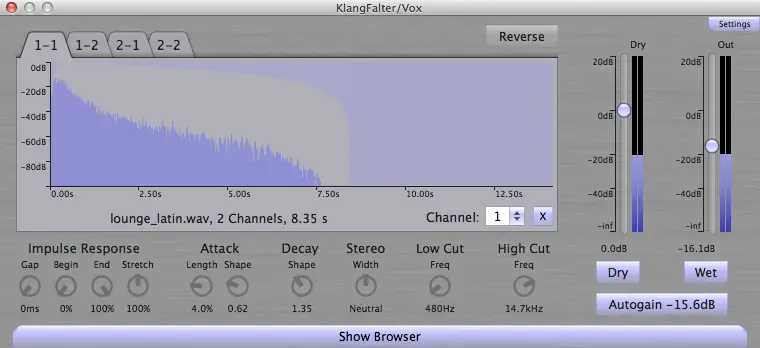
- Click on the “Settings” button to adjust the folder which contains your impulse response files.
- Click on “Show Browser” and select some impulse response files.
- KlangFalter tries to find matching impulse response files automatically by searching for matching file names (e.g. left/right and true stereo).
- You can load impulse response files for specific channel connections by clicking on the file name beneath the wave form display of the according tab.
- You can clear the impulse response of a specific channel connection by clicking on the “X” button of the according tab.
KlangFalter doesn’t come with any impulse respones, but you can find many free and good impulse response collections on the web. Any file format supported by JUCE should work (currently at least .wav, .mp3, .aiff, .ogg and a couple more).
- Wet/Dry: Adjustment of the wet and dry signal.
- Autogain: “Normalizes” the loaded impulse responses in order to achieve a consistent level.
- Stereo Width: Adjusts the – guess what – stereo width.
- Click on the label on top of the right level display to switch the according level measurement between “out” and “wet” mode.
- Gap: Additional gap at the begin of the impulse response (“pre-delay”).
- Begin: Begin of the impulse response.
- End: End of the impulse response
- Stretch: Stretches the impulse response.
- Attack Length & Shape: Modifies the front (attack) of the impulse response.
- Decay Shape: Modifies the decay of the impulse response
- Reverse: Reverts the impulse response for spacy effects.
- Click on the timeline at the bottom of the waveform display to switch time measurement between time and beats-per-minute (useful e.g. for timing reverbs to the music).
- Click on the header of the low resp. high EQ to switch between cut and shelf filter.
- Freq: Adjusts the frequency of the according EQ.
- Gain: EQ gain (only available if working as shelf filter).
https://github.com/jd-13/KlangFalter


klangfalter-1.0.0 ( 9 MB )

We’re audio producers and sound designers with over 20 years of experience in the industry. Our team has lived through the entire evolution of digital audio production.
Our mission? To filter out the junk and bring you only the studio-ready free VSTs that actually compete with paid gear. We do the digging so you can focus on creating.
Recent Posts
Relic – 13 Analog Plugins
Tired of your in-the-box mixes sounding flat, sterile, and cold? We have all been there - you stack clean digital…
StereoiXer – Spatial Processor
Are your mixes sounding flat, boxed-in, and totally lifeless? I found a fix. We have all been there in the…
StemDeck – AI Stem Splitter
We've all been there: you stumble across an absolute grail of a sample, but the kick is clashing hard with…
DiodeCrush – Crush Compressor
Are your drums sounding a little too polite and thin? We've all hit that wall where standard digital compressors keep…
Focus – Stereo Bus Utility
Tired of your mix sounding wide in your headphones, but the second you test it in the car or on…
The Usual Suspects – Plugin Manager
What's good fam! Nothing kills the studio vibe faster than sitting down to cook up, opening your DAW, and realizing…