javaDAW v.1.2

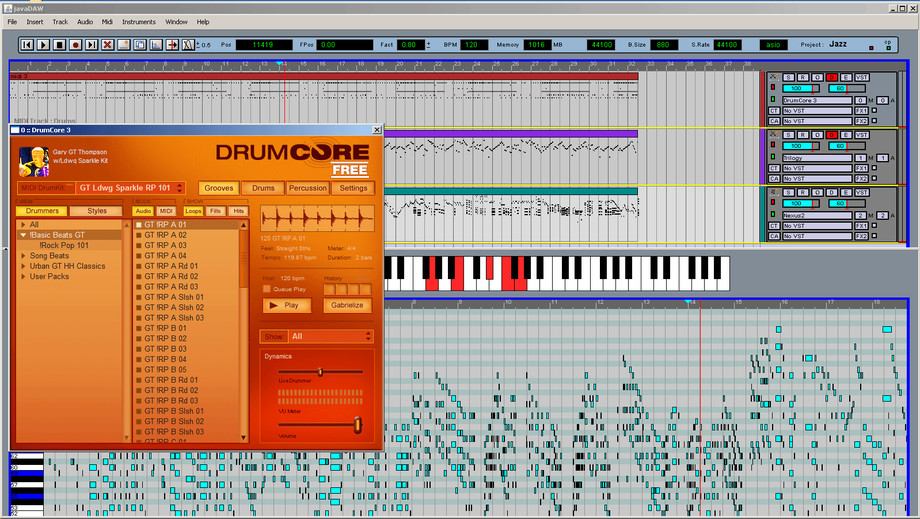
javaDAW v.1.2
size 9.15 MB
javaDAW is a Java Sequencer for playing and manipulating MIDI files, however the source code is not available yet but will be in the future when everything is stable. Java DAW can be used without a license, it is just a “fun” project to test the boundaries of java and music. javaDAW is completely build in Java and uses the VST plugin and ASIO solutions of Martin Roth.
This means most common VST plugins and ASIO drivers can be used. In java DAW you may create MIDI clips and add midi notes to each clip with a (double) click of your mouse. Insert a Midi track, assign a VST Plugin to a track (F3) and hit the play button (space bar) after insert a midi file of course. You can also create and import audio clips.
javaDAW makes manipulating MIDI Files very easy. In addition, java DAW provides many more features:
– Using ASIO or Java Sound.
– Importing and exporting (multiple) MIDI files.
– Importing and exporting .wav files.
– Drag and drop functionality for these files directly form the Desktop.
– Manipulate clips and MIDI notes (delete, copy, etc…..)
– Quantisize MIDI notes and clips(F5 & F6).
– Add and connect MIDI controllers to javaDAW.
– Recording directly form your MIDI controller.
– Quantisize MIDI notes when recording.
– Scale up and down when in the clip of midi edit area(CNTRL left/right arrow).
– Add, copy and remove MIDI and Audio tracks(F7).
– Play and hit the follow button.
– Use automation on volume and modulation (midi messages).
– Use (S)tep mode to learn a piano piece.
– Follow a score presentation of your MIDI file.
– Use the step sequencer and MIDI keyboard to learn a piece.
– Change VST plugins whenever you like.
– Add FX VST plugins whenever you like.
– Add and adjust automation per track for volume and modulation.
– Adjust the edit areas for the note and clip editing.
– Save and read project files.
– Add pattern files for drum, base and organ directly into your project.
– Export an AUDIO file in .wav format.
– Import an AUDIO file in .wav format (16 bit).
– Record an AUDIO signal from microphone or keyboard.
– Add a MIDI channel or an AUDIO channel.
Download javaDAW EXE file for Windows (32/64 bit).

javadaw ( 9.15 MB )

We’re audio producers and sound designers with over 20 years of experience in the industry. Our team has lived through the entire evolution of digital audio production.
Our mission? To filter out the junk and bring you only the studio-ready free VSTs that actually compete with paid gear. We do the digging so you can focus on creating.
Recent Posts
Cider – Multi-Engine Sidechain
Tired of your kick and sub bass fighting for their lives in the low end? We’ve all been there -…
GAMEOVER – Chiptune Generator
What's good fam! We have all been there - staring at a blank piano roll, trying to hand-draw a bouncy,…
Unirock Cherry LPS – Guitar VST
Tired of stiff, robotic virtual guitars ruining the vibe of your tracks? We have all been there - you drop…
Gluon – Free Bus Compressor
Are your tracks sounding thin and disconnected, with your drums, synths, and bass constantly fighting each other instead of sitting…
ToneShaper – Passive Tone EQ
Tired of digital EQs making your top end sound brittle or totally muddying up your low-mids? I found a fix.…
GALAXY – Dynamic Sampler
Tired of sitting on hundreds of gigabytes of sample packs you never touch? We have all been there. You drop…