Gravity Channel – Channel Strip

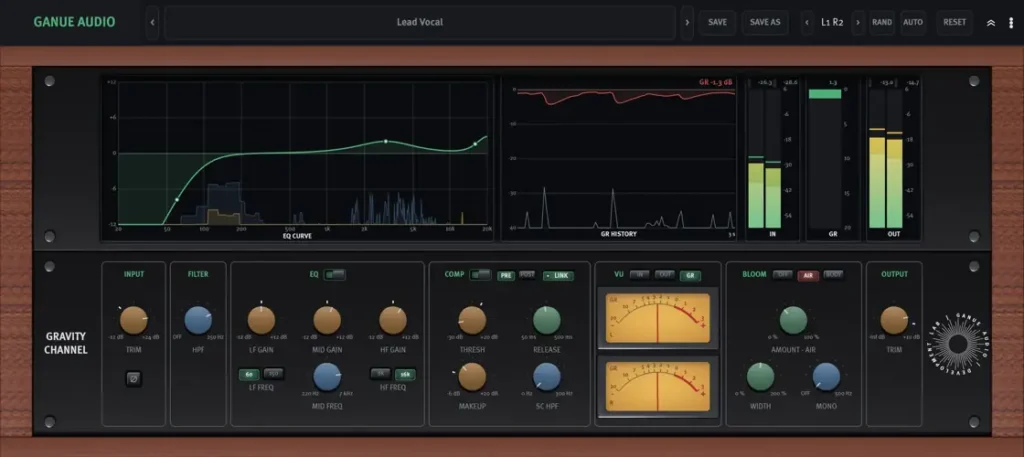
Are your mix sessions getting bogged down by endless plugin chains just to clean up a simple vocal or drum track? We have all been there – stacking five separate plugins across 40 channels until your CPU is screaming and your mix vibe grinds to a dead halt. You lose your momentum jumping between windows just to tweak basic headroom and tone.
Gravity Channel by GANUE Audio fixes that entire headache in one move, bringing pure console-style precision straight to your DAW without taking a bite out of your wallet.
Why Gravity Channel is a Game-Changer for Your Mix & Workflow
Built to live on every single channel in your session, this strip stays completely transparent out of the box until you decide to push some color into the signal. Here is how it levels up your mixing game:
- Unified Console Workflow: Dial in your input trim, flip polarity, clean up mud with the 12 dB/octave HPF, shape tone, clamp dynamics, and set final levels – all inside one calm, distraction-free interface.
- Musical 3-Band EQ: Gentle low and high shelves with switchable corner frequencies, paired with a swept proportional-Q mid band that stays wide on subtle boosts and tightens up for surgical cuts.
- Transparent VCA Glue: A smooth 2:1 RMS-detected compressor with a soft knee and fast attack lets your initial transients hit cleanly while keeping overall dynamics rock-solid.
- BLOOM Harmonic Saturation: Tap into vintage Class A transformer-style second and third harmonics. Flip to “Air” for top-end shimmer or “Body” to inject low-end warmth and punch.
- Analog Channel Variation (1 – 72): Replicate the natural, minute channel-to-channel differences of a massive vintage desk across your entire multi-track mix.
- Lightning-Fast & Ultra-Light: The latest v1.0.4 update makes the GUI open instantly, slashes memory consumption by over 100 MB per instance, and delivers pristine up to 8x oversampling.
⚡ Pro Producer Tip: Transformer Warmth with BLOOM
Engage the BLOOM stage on the ‘Body’ voicing with around 15 – 25% blend on your kick or bass tracks before hitting the compressor. This saturates the low-mids and tames wild dynamic spikes naturally, allowing the VCA compressor to gently glue the low-end together without killing your punch.
Tech Specs (Keep it Light)
- Developer: GANUE Audio
- Version: 1.0.4
- Formats: VST3, AU, Standalone
- Compatibility: Windows & macOS (64-bit)
- Oversampling: Up to 8x (Independent Realtime & Render settings)
- Licensing: 100% Free – No iLok, dongles, or online activation required
The Verdict
Gravity Channel is one of those rare workhorse tools that immediately earns a spot on your default DAW template. Whether you need to sculpt a punchy snare, glue a vocal track, or spread out the stereo field on your synth buses, this channel strip delivers analog character and elite workflow without eating up your CPU.


Gravity.Channel.1.0.4 ( 135 MB )
Let me know in the comments how this sits in your latest project! Are you rocking the ‘Air’ mode on your vocals or using ‘Body’ to fatten up your low end? Let’s talk shop below! 👇

We’re audio producers and sound designers with over 20 years of experience in the industry. Our team has lived through the entire evolution of digital audio production.
Our mission? To filter out the junk and bring you only the studio-ready free VSTs that actually compete with paid gear. We do the digging so you can focus on creating.
Recent Posts
BREAKER Microphone Filter Lite Version
How many times have you tracked a vocal that sounds too clean? You've got pristine conversion, a flat mic, zero…
Morph Saturation – Pro Saturator
Are your mixes sounding flat, sterile, and starved of energy? We've all been there. You stack layers of pristine digital…
IridiumVST – Flagship Poly Synth
Tired of stacking five different stock synth plugins just to get a single patch to sound full? I found a…
Morph Distortion – Wave Shaper VST
Tired of thin 808s, sterile synths, and brittle digital drive eating up all your precious headroom? I found a serious…
FSVR – Formant FM Synth
I was digging through the web late last night, hunting for that elusive sonic mojo, and I stumbled upon something…
Harmonic EQ – Pitch-Tracking EQ
Tired of your static EQ cuts falling completely flat the second your bassline moves or your vocalist hits a higher…