GrainBrain – Granular Delay

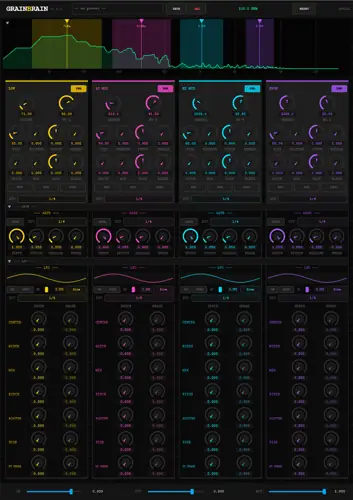
Are your pads and soundscapes sounding lifeless and static? I found a serious fix. As producers, we all know the struggle: you want to add some crazy, evolving texture to a synth or a vocal, but the second you throw a standard granular delay or reverb on it, the low end turns into absolute mud and destroys your headroom.
You end up having to stack a bunch of EQs and routing tricks just to clean it up so the track sits in the mix right. Enter GrainBrain – this thing absolutely slaps and solves that exact problem by letting you split your signal before getting granular.
Why GrainBrain is a Game Changer for Your Mix & Workflow
- Independent Band Strips – Sculpt your highs into a crazy shimmer while keeping your sub frequencies punchy, clean, and completely untouched.
- 8 – Voice Granular Engine Per Band – Tweak grain size, scatter, and pitch on each band independently. It even has Reverse and Freeze modes for instant glitch vibes.
- Live Spectrum View – Stop guessing where your crossovers are. Watch the band split and grain activity live so you can visually dial in the sauce.
- Cross Band Bleed – Feed the output of your lows into the mids, and mids into the highs. This creates wild, self – reinforcing textures that sit in the mix perfectly.
- BPM – Synced Stutter Gate – Lock your amplitude patterns right to the host tempo for instant rhythmic bounces that groove with your beat.
- Ducked, Equal – Power Master Mix – The dry and wet signals displace each other instead of just blindly stacking. Your granular textures stay loud without eating up precious headroom or getting muddy.
⚡ Pro Producer Tip: Cross Band Ghost Vocals
Try tossing GrainBrain on a lead vocal send. Disable the granular engine on the Low and Low – Mid bands, but turn up the Cross Band Bleed. Let the vocal drive the High – Mid and High bands with a ton of scatter and a slight pitch shift up. You will get this crazy, airy, whispering ghost texture that follows the vocal without masking the main dry signal!
Tech Specs (Keep it Light)
- Format: VST3
- OS: Windows & macOS
- Size: 11.5 MB (super lightweight for the CPU!)
- Price: Free / Donation – ware (If it earns a place in your template, drop the dev a tip at buymeacoffee.com/brittnell)
The Verdict
If you do any sort of sound design, beatmaking, or cinematic scoring, GrainBrain is a must – download. It covers the gap between a simple texture enhancer and a full – blown sound design instrument.
The workflow is fast, the GUI gives you crazy visual feedback, and most importantly, it sounds incredibly wide and expensive. Go grab it and let your beats breathe.


GrainBrain.1.0.1 ( 11 MB )
Let me know in the comments how this sits in your latest project! Are you using this for lush ambient pads or crazy glitchy stutters? Let’s talk shop below! 👇

We’re audio producers and sound designers with over 20 years of experience in the industry. Our team has lived through the entire evolution of digital audio production.
Our mission? To filter out the junk and bring you only the studio-ready free VSTs that actually compete with paid gear. We do the digging so you can focus on creating.
Recent Posts
Dream Cassette MAX – Tape Color VST
Tired of your tracks sounding sterile, flat, and way too digital? I found a fix. We’ve all fought that battle…
FB3 – Retro Synth VST
How many times have you loaded up a modern synth preset hoping for some authentic vintage texture, only to end…
PRiSM – Granular Dream Engine
What's good fam. We have all been there - you lay down a solid chord progression or chop up a…
HORIZON – Free Stereo Imager
Are your mixes sounding flat and boxed-in? I found a serious fix today. We've all been there - you slap…
VarispeedDelay – Pitch Tape Delay
I've been digging through the web and found something special for your arsenal. We’ve all been there: you drop a…
RADAR VST WiN
Tired of your dry melodies sounding flat, stiff, and completely dead in the mix? We've all been there - you…