Gamelanizer v1.1.0 WiN Mac

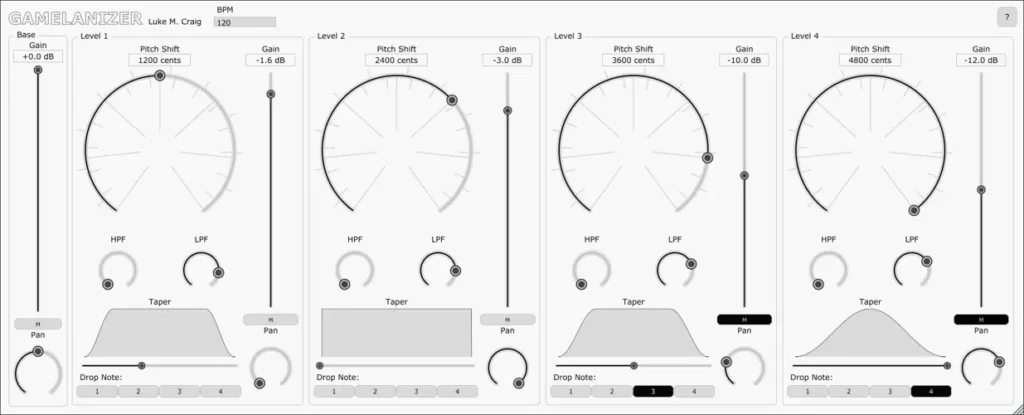
Gamelanizer
33 MB
Accompanying material for the paper ‘A Real-Time Audio Effect Plug-In Inspired by the Processes of Traditional Indonesian Gamelan Music’
Builds of the plug-in VSTs for Windows and macOS can be found in the releases tab of the repo. The VSTs have only been tested in the latest version of REAPER. If you try them in another DAW feel free to let us know if they work.
Usage
Builds of the plug-in VSTs for Windows and macOS can be found in the releases tab of the repo. The VSTs have only been tested in the latest version of REAPER. If you try them in another DAW feel free to let us know if they work.
To use them, copy them to the directory where you DAW expects VSTs. When the plug-in is detected by your DAW it can be inserted on any audio track. Before beginning playback, you should set the BPM field in the plug-in GUI to match the host, assuming the input audio is in quarter-notes. If it’s in half-notes, set the plug-in BPM to half the DAW BPM. If it’s in eighth-notes, set the plug-in BPM to twice the DAW BPM. Sessions with changing tempos are not currently supported. For best results, the input audio should be quantized to the grid.
The pitch shift rotary knobs indicate perfect fourth, fifths, and octaves. To snap to these intervals, hold the modifier keys while dragging. Try stacking fourth and fifths or try unison by setting all the knobs to 0. Setting the sliders below 0 will use slightly more processing power. The high-pass and low-pass filters can be useful for putting the different subdivision levels further in the background. The “Drop Note” buttons mute the respective notes from being output (dropping note 4 from Level 2 means that every 4th sixteenth-note becomes a rest).
The plug-in currently only supports mono input. There are 7 output buses. Buses 1+2 are the default stereo out. Bus 3 is the input signal. Bus 4,5,6,7 are the mono outputs of Level 1,2,3,4. Use these buses if you want to combine Gamelanizer with other plug-ins and complicated routing. During playback, the filters and gain sliders should apply instantly if you move them. Changes to the pitch shift knobs will be delayed by a significant amount. However, if you write the automation in the DAW, then it will occur when it ought to.
https://github.com/lukemcraig/DAFx19-Gamelanizer


Gamelanizer_v1_1_0 ( 33 MB )

We’re audio producers and sound designers with over 20 years of experience in the industry. Our team has lived through the entire evolution of digital audio production.
Our mission? To filter out the junk and bring you only the studio-ready free VSTs that actually compete with paid gear. We do the digging so you can focus on creating.
Recent Posts
Room Service – Plate Reverb
Tired of free reverb plugins turning your lead vocals into a washed-out, muddy mess? We've all been there. You want…
Bit Layer – Multi-Band Crusher
Tired of traditional bitcrushers completely wrecking your punch and turning your low end into pure digital mud? We've all been…
RMSC – Ring Mod Sidechain
Tired of your kick and 808 fighting for low - end real estate? I found a wild fix today. We’ve…
PortaTwin – Cassette Strip
Are your mixes sounding thin and way too sterile? I feel your pain. In modern in-the-box production, clean digital recording…
UnClip – Clip Restorer
Ever had an artist send over an insane vocal take, only to zoom in and see the waveform completely pinned…
Audio Quick Actions – Mac Audio Suite
Tired of firing up a CPU-heavy DAW session just to check a sample's key or see if your two-track bounce…