Face Bender

Face Bender
size 1.24 MB / 1.30 MB
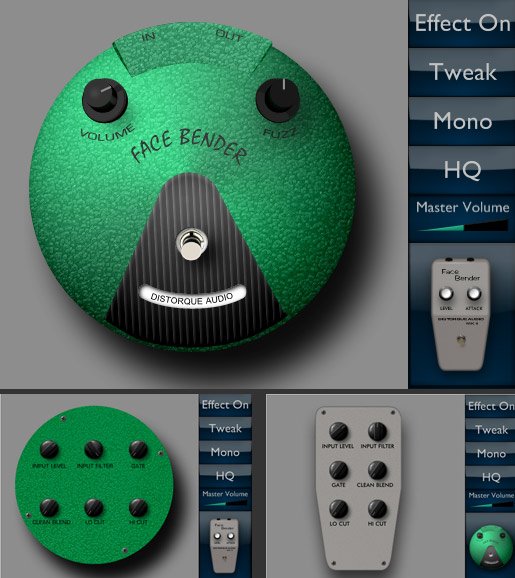
This is an emulation of a Fuzz Face and a Tone Bender MKII with added controls for tweaking. It runs in mono or stereo, and has selectable 2x oversampling.
The Fuzz Face was first made by Arbiter Electronics in 1966. It had a thick, fuzzy distortion and was made famous by artists like Jimi Hendrix, Eric Clapton, and David Gilmour. The Tone Bender MKII was also released in 1966, by Sola Sound. Compared to the Fuzz Face, it has a brighter, more distorted sound.
Sidebar :
- Effect On/Bypass – This switches the effect on or off.
- Tweak – This switches from the normal effect menus to the tweak menus. Note that the controls on the Fuzz Face tweak menu and the Tone Bender tweak menu are independent of one another.
- Mono/Stereo – This switches between mono and stereo operation.
- LQ/HQ – This switches between low quality and high quality modes. The high quality mode has 2x oversampling and slightly more realistic processing, but uses more CPU power than the low quality mode.
- Master Volume – This is a volume control that applies to both effects.
- Effect Type – This switches between the Fuzz Face emulation and the Tone Bender emulation.
Fuzz Face :
- Volume – This controls the Fuzz Face’s output volume.
- Fuzz – This controls the Fuzz Face’s distortion.
Tone Bender :
- Volume – This controls the Tone Bender’s output volume.
- Attack – This controls the Tone Bender’s distortion.
Tweak Menus :
- Input Level – This controls the volume going into the effect.
- Input Filter – This controls how much filtering is done on the input. Try turning it down for a brighter tone. To emulate the volume control clean-up of the fuzz face, turn down both the Input Level and the Input Filter controls.
- Gate – This changes the bias of the effect, making a gated sound. This can be used as a noise gate, but works better for splattery fuzz sounds.
- Clean Blend – This blends in clean input signal with the distorted fuzz.
- Lo Cut – This controls the bass on the input.
- Hi Cut – This controls the treble on the output.
https://sites.google.com/site/distorque/


Distorque_FaceBender ( 1.24 MB )
Distorque_FaceBender_x64 ( 1.30 MB )

We’re audio producers and sound designers with over 20 years of experience in the industry. Our team has lived through the entire evolution of digital audio production.
Our mission? To filter out the junk and bring you only the studio-ready free VSTs that actually compete with paid gear. We do the digging so you can focus on creating.
Recent Posts
Cozy Piano – Lo-Fi Upright VST
Tired of sterile, overly polished grand piano libraries that hog all your headroom and sound like a corporate commercial? I…
magic.METER – Vocal Analyzer
Tired of guessing why your lead vocal just won't sit in the pocket like a Billboard smash? We have all…
MS2000R Emulator – VA Synth
I've been digging through the web and found something special for your arsenal today, fam. We have all been stuck…
CA-72 – Analog Synth VST
I've been digging through the web and found something special for your arsenal today. Let's keep it real: how many…
X-Or – Free Bass Synth
Tired of your low end feeling thin, cluttered, or fighting your kick for headroom? I found a fix that hits…
TagoClip – Soft Clipper VST
If you have ever bounced from FL Studio over to Ableton, Logic, or Reaper, you know the exact heartbreak I…