Dynaverse – Dynamic Delay VST

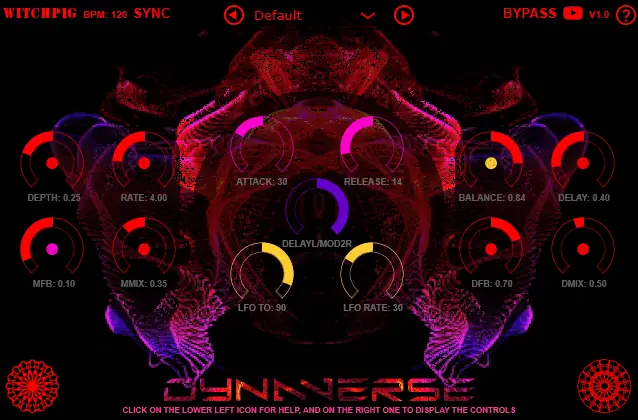
I just stumbled upon this gem today while digging for something to spice up a flat synth lead. You know the struggle—you slap a standard delay on a track, but it just sits there, taking up way too much headroom and muddying up the mix. It lacks movement; it lacks soul. You end up with a wall of sound that fights your main melody instead of supporting it.
That’s where Dynaverse steps in. This isn’t just a static echo chamber; it’s a dynamic tool that actually listens to your audio. Whether you need your tails to duck out of the way when the kick hits, or you want a flanger to swell up only during the quiet parts, this plugin brings that “breathing” effect that makes a track feel alive.
Why Dynaverse is a Game-Changer for Your Mix & Workflow
This plugin is all about movement and modulation. It takes the concept of a standard delay and injects it with a serious dose of creative routing. Here’s why this plugin deserves a spot in your folder:
- Reactive Mixing: With the input volume automation (the pink controls), you can make the delay duck or swell based on the incoming signal. This keeps your mix clean and ensures the effect sits perfectly in the pocket.
- Dual-Threat Modulation: The purple control lets you switch routing between Chorus and Flanger modes, giving you instant access to wide, shimmering textures or deep, metallic sweeps.
- Rhythmic Automation: The built-in LFO (yellow controls) allows you to automate parameters based on a cycle, adding a constant, evolving groove to your sound design.
- Visual Workflow: The color-coded system (Red for static, Pink for volume input, Yellow for LFO) makes it super easy to see exactly what is modulating your sound at a glance.
⚡ Pro Producer Tip: The “Ghost” Vocal Trick
Use the “Pink” control (Volume Input) on the feedback parameter. Set it so that when the vocalist sings loudly, the feedback is low, but when they stop or take a breath, the feedback swells up. This fills the empty spaces in the arrangement with a ghostly echo without clashing with the lead vocal. It adds instant vibe without the automation headache.
Tech Specs (Keep it Light)
- Format: VST (Windows & Mac)
- Size: A chill 36 MB (won’t clog your drive)
- Key Features: Chorus/Flanger routing, LFO generation, Envelope Follower.
The Verdict
If your sound design is feeling a little stale, Dynaverse is the sauce you need. It’s rare to find a free tool that handles dynamic modulation this intuitively. It’s perfect for dub techno chords, spacey trap melodies, or just adding some weird artifacts to a drum break. It slaps, it’s free, and it’s ready to work.


Dynaverse ( 36 MB )
Let me know in the comments how this sits in your latest project! Do you prefer automating with the LFO or the Input Volume? Let’s talk shop below! 👇

We’re audio producers and sound designers with over 20 years of experience in the industry. Our team has lived through the entire evolution of digital audio production.
Our mission? To filter out the junk and bring you only the studio-ready free VSTs that actually compete with paid gear. We do the digging so you can focus on creating.
Recent Posts
HLF-3C – Passive EQ Filter
Tired of your instrument busses sounding like a muddy, cluttered mess? I found a fix. There is nothing worse than…
GMXR2 – Audio Generator
Tired of spending hours digging through bloated sample packs just to find a simple riser, laser, or transition FX? I…
Supreme Drums One Synth – Drum VST
Are your drum busses sounding thin and lifeless, or taking way too long to dial in? I found a fix.…
AliasSynth – Glitch Synth
I’ve been digging through the web and found something truly special for your arsenal today. Let’s keep it real for…
Yabridge – Windows VST Bridge
Tired of leaving your favorite heavy-hitting Windows plugins behind just because you're cooking up beats on a Linux machine? I…
YS Phantasm – Analogue Enhancer
Are your mixes sounding a little too sterile and digital? I found a fix. We all know the real studio…