Delphi DSP – Chop n Dice Lite

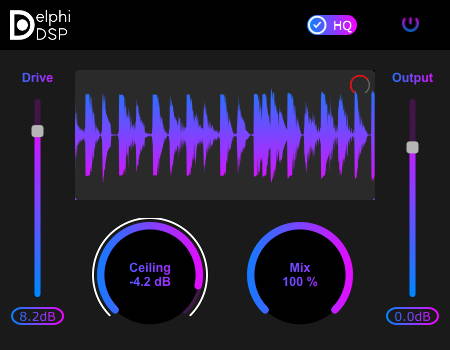
Chop n Dice Lite
size 1 MB
Chop n Dice Lite is an easy to use clipper featuring one Hard Clip algorithm.
Adjust the Ceiling slider to set the decibel value where you want your audio to start clipping. Use the “Arc meter” that is along side the ceiling slider to determine where to set the ceiling. Then push the signal with the “Input Gain” slider into the ceiling.
Watch the waveform display area to see what part of the audio is getting chopped. If the waveform is scrolling too fast or too slow for your liking, adjust the “Waveform Scroll Speed” control (red circular slider on top right of the waveform display).
Adjust the mix slider to bring back some of the dry signal into the output. And finally adjust the Output Gain slider to set the final output level of the signal.
Enable HQ (High Quality) mode for 4x oversampling.
VST3 64 bit.


Chop-n-Dice-Lite ( 1 MB )

We’re audio producers and sound designers with over 20 years of experience in the industry. Our team has lived through the entire evolution of digital audio production.
Our mission? To filter out the junk and bring you only the studio-ready free VSTs that actually compete with paid gear. We do the digging so you can focus on creating.
Recent Posts
Paradigm Lite – Vintage Synth VST
What's good fam! If you've been cooking up in the box lately, you know the daily studio struggle: you lay…
The Final Master – Smart Mastering
Tired of your mixes sounding quiet, thin, or completely squashed when you try to master them yourself? I found a…
Wave Emulation – Wavetable Synth
I've been digging through the web and found something special for your arsenal. Let's keep it 100 - so many…
MANTIS Lite – Distortion Plugin
Tired of digital distortion plugins that sound stiff, fizzy, and completely rob your drums of their punch? We have all…
Stereo Unlimited – Stereo Widener
Tired of your synths and background vocals fighting for space dead in the center? We have all been there -…
CY-FAN Lite – Creative Modulation
Are your synth chords and guitar tracks feeling completely flat and lifeless in the DAW? I found a fix. We…