Delphi DSP – Chop n Dice Lite

Chop n Dice Lite
size 1 MB
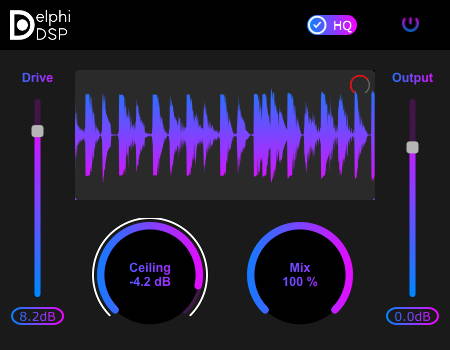
Chop n Dice Lite is an easy to use clipper featuring one Hard Clip algorithm.
Adjust the Ceiling slider to set the decibel value where you want your audio to start clipping. Use the “Arc meter” that is along side the ceiling slider to determine where to set the ceiling. Then push the signal with the “Input Gain” slider into the ceiling.
Watch the waveform display area to see what part of the audio is getting chopped. If the waveform is scrolling too fast or too slow for your liking, adjust the “Waveform Scroll Speed” control (red circular slider on top right of the waveform display).
Adjust the mix slider to bring back some of the dry signal into the output. And finally adjust the Output Gain slider to set the final output level of the signal.
Enable HQ (High Quality) mode for 4x oversampling.
VST3 64 bit.


Chop-n-Dice-Lite ( 1 MB )

We’re audio producers and sound designers with over 20 years of experience in the industry. Our team has lived through the entire evolution of digital audio production.
Our mission? To filter out the junk and bring you only the studio-ready free VSTs that actually compete with paid gear. We do the digging so you can focus on creating.
Recent Posts
HLF-3C – Passive EQ Filter
Tired of your instrument busses sounding like a muddy, cluttered mess? I found a fix. There is nothing worse than…
GMXR2 – Audio Generator
Tired of spending hours digging through bloated sample packs just to find a simple riser, laser, or transition FX? I…
Supreme Drums One Synth – Drum VST
Are your drum busses sounding thin and lifeless, or taking way too long to dial in? I found a fix.…
AliasSynth – Glitch Synth
I’ve been digging through the web and found something truly special for your arsenal today. Let’s keep it real for…
Yabridge – Windows VST Bridge
Tired of leaving your favorite heavy-hitting Windows plugins behind just because you're cooking up beats on a Linux machine? I…
YS Phantasm – Analogue Enhancer
Are your mixes sounding a little too sterile and digital? I found a fix. We all know the real studio…