AutoADM – Apple Master Fix

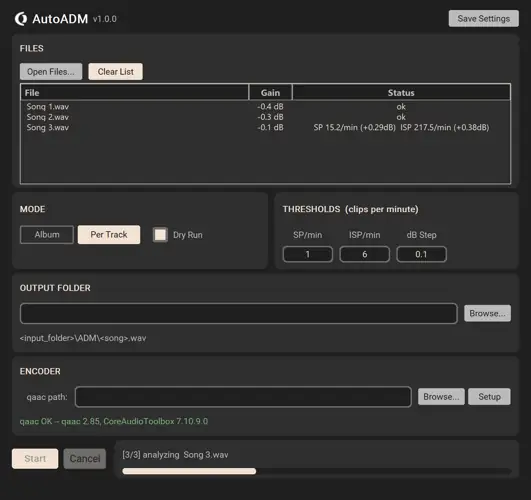
Tired of your flawless masters getting crushed by streaming encoders? I found a fix.
Every producer knows this struggle: you spend hours getting your track to slap in the studio. The low-end is tight, the vocals sit perfectly in the mix, and your limiter is doing God’s work. You bounce the WAV, upload it to your distributor, and then… Apple Music’s AAC encoder gets ahold of it. Suddenly, you’re hearing inter-sample peaks (ISPs) and nasty digital clipping right when the beat drops. It totally kills the vibe.
That’s where AutoADM comes in. This lightweight, standalone Mac utility automatically preps your WAVs to survive the Apple Digital Masters process, doing all the heavy lifting to ensure your record translates exactly how you intended.
Why AutoADM is a Game-Changer for Your Mix & Workflow
This tool isn’t just another flashy meter; it actually fixes the problem at the source. Here is how AutoADM brings the sauce to your mastering chain:
- Flawless Full-Length Projects (Album Mode): Master an entire EP or album? Album mode analyzes all your tracks and applies a uniform gain reduction based on the worst-case file. This preserves the volume relationships between your songs so the vibe stays consistent from intro to outro.
- The Exact Apple Engine: No third-party guesswork here. AutoADM uses Apple’s actual afconvert encoder—the exact same server-side tool Apple Music uses. You’re testing your masters against the real deal.
- Smart Headroom Preview (Dry Run): Don’t want to commit yet? Run a “Dry Run” to see exactly how much gain reduction your mix needs to pass the test, without rewriting any files.
- Intuitive Clip Tolerances: Instead of guessing random True Peak dB ceilings, you can set intuitive Clips-per-Minute thresholds for Sample Peaks (SP) and Inter-Sample Peaks (ISP). You control what’s acceptable.
- Preserves Your Original Quality: It spits out WAV files in an /ADM/ folder with your exact original sample rate and bit depth intact. No forced downsampling ruining your high-res audio.
⚡ Pro Producer Tip: USE DRY RUN FOR MASTERING FEEDBACK
Run your final bounce through AutoADM’s Dry Run feature before you call a track “done.” If the app tells you it needs a massive amount of gain reduction to pass Apple’s specs, you know your master is being pushed way too hot. Go back to your DAW’s limiter, dial back the ceiling a touch, and give your mix the breathing room it deserves to sound huge on streaming!
Tech Specs (Keep it Light)
- Format: Standalone Mac App (OD AutoADM.app)
- Installation: Zero install required. Just extract the archive and run it!
- Size: A super lightweight 92 MB footprint.
- Workflow: Simple Drag & Drop functionality.
- Compliance: Uses BS.1770-4 ISP Detection with 4× polyphase oversampling.
The Verdict
If you want your music to be taken seriously on streaming platforms, you need to be mindful of encoder clipping. AutoADM takes the headache out of mastering for Apple Music.
By iteratively attenuating your files until they are peak-safe, it ensures your kicks keep their punch and your top-end stays smooth, no matter what Apple’s compression algorithm throws at it. Best of all? It’s incredibly fast and easy to use. Grab it, drag your WAVs in, and protect your sonics.


OD.AutoADM.1.0.2 ( 92 MB )
Let me know in the comments how this sits in your latest project! Are you guys already mastering specifically for streaming platforms, or just bouncing one loud master for everything? Let’s talk shop below! 👇

We’re audio producers and sound designers with over 20 years of experience in the industry. Our team has lived through the entire evolution of digital audio production.
Our mission? To filter out the junk and bring you only the studio-ready free VSTs that actually compete with paid gear. We do the digging so you can focus on creating.
Recent Posts
Cozy Piano – Lo-Fi Upright VST
Tired of sterile, overly polished grand piano libraries that hog all your headroom and sound like a corporate commercial? I…
magic.METER – Vocal Analyzer
Tired of guessing why your lead vocal just won't sit in the pocket like a Billboard smash? We have all…
MS2000R Emulator – VA Synth
I've been digging through the web and found something special for your arsenal today, fam. We have all been stuck…
CA-72 – Analog Synth VST
I've been digging through the web and found something special for your arsenal today. Let's keep it real: how many…
X-Or – Free Bass Synth
Tired of your low end feeling thin, cluttered, or fighting your kick for headroom? I found a fix that hits…
TagoClip – Soft Clipper VST
If you have ever bounced from FL Studio over to Ableton, Logic, or Reaper, you know the exact heartbreak I…