Analog Obsession Fet Bundle VST3 AU AAX WiN macOS

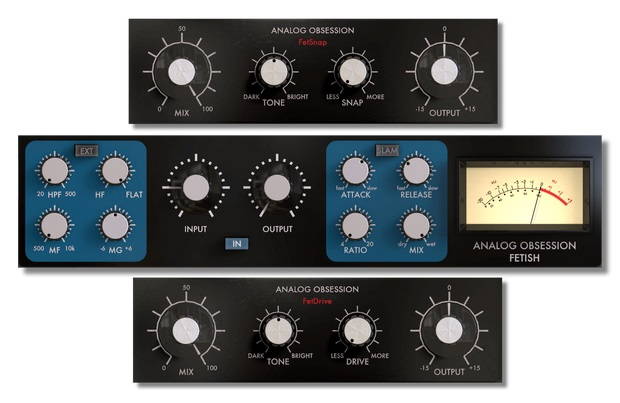
Analog Obsession Fet Bundle WiN macOS
71 MB
Fet Bundle
– FETish –
Classic FET Compressor/Limiter with extra features!
Features
– INPUT: Extended 0 to 60dB input gain. Internally compensated input knob to drive circuit and get compression. With original gear, input will boost signal without compensation. With FETish, you don’t have to reduce volume while you boost input.
– OUTPUT: -30 to +30dB Make-Up Gain to compensate compressed signal
– ATACK: 20 to 800 microseconds with reversed knob to adjust without confusion.
– RELEASE: 50ms to 1.1sec with reversed knob to adjust without confusion.
– RATIO: Selectable 4:1, 8:1, 12:1 and 20:1. Each has it’s own curve and range to start compress. While you use lowest ratio, you should get compression quickly when you boost input. With higher ratios, compression will start at higher input gains.
– HPF: 20 to 500Hz HPF to keep low frequencies from sidechain circuit. So, compressor won’t touch to low-end.
– MID F.(Frequency 500Hz to 10kHz) / MID G.(Gain -6dB to +6dB): With these two knobs, you can set mid frequency and set it to compress more or less. If you boost mid gain (broad band), you will get more compression on selected frequency. If you reduce mid gain, mids will be less compressed.
– HF: HF knob will help you to compress high more. While FLAT position keeps highs natural, HF position will compress highs more.
– MIX: Will let you blend compressed and dry signal.
– SLAM: With this function, you will get ultra-fast and aggressive limiting option. You can use this function for every ratio.
– EXT: This will let you use external signal to compressed input signal.
– IN: Plugin Bypass
– ANALOG OBSESSION: This label is clickable. It will turn to red and engage Oversampling
– Resizable interface. Simple “Bottom Right Corner Handle” to resize. 50% to 200%
– FetDrive –
Classic FET Compressor’s Saturation
Features
– DRIVE: It will rise your input level (with gain compensation) and will saturate your signal. Input range is really extended to get more drive!
– TONE: Tone will shape your source before drive section. So, it’s Pre-Tone Control. This will let you decide which frequency range will be saturated.
– MIX: Will blend dry and wet signal.
– OUTPUT: Final output stage after MIX knob.
– PLUGIN LABEL: It’s regular bypass. It will turn to white when plugin is bypassed.
– ANALOG OBSESSION: This label is clickable. It will turn to red and engage Oversampling
– Resizable interface. Simple “Bottom Right Corner Handle” to resize. 50% to 200%
– FetSnap –
Classic FET Compressor’s Transient Enhancer
Features
– SNAP: It will enhance attack time and reduce release of signal.
– TONE: Tone will shape your source before drive section. So, it’s Pre-Tone Control. This will let you decide which frequency range will be saturated.
– MIX: Will blend dry and wet signal.
– OUTPUT: Final output stage after MIX knob.
– PLUGIN LABEL: It’s regular bypass. It will turn to white when plugin is bypassed.
– ANALOG OBSESSION: This label is clickable. It will turn to red and engage Oversampling
– Resizable interface. Simple “Bottom Right Corner Handle” to resize. 50% to 200%
*Resizing Tip: When you duplicate plug-in, it will remember current state of GUI size. But if you load new instance, it will be opened at default size. To get rid of this issue, simply follow these steps;
1. Open plug-in for the first time
2. Resize GUI according to your screen resolution or you liking before setting any knobs
3. Save this state as default preset with your DAW
Now, you will be able to load new instances with same size.
(If you want to go default size, simply double click to resize handle.)
AVAILABLE FORMATS
VST3 / AU / AAX Native – Audiosuite | Mac 10.11 – 13.X | Intel / Apple Silicon
VST3 / AAX Native – Audiosuite | Windows 10 – 11
Mac Versions require a graphic card that supports “Metal”
Windows Versions require a graphic card that supports “OpenGL”


Download ( 71 MB )

We’re audio producers and sound designers with over 20 years of experience in the industry. Our team has lived through the entire evolution of digital audio production.
Our mission? To filter out the junk and bring you only the studio-ready free VSTs that actually compete with paid gear. We do the digging so you can focus on creating.
Recent Posts
HLF-3C – Passive EQ Filter
Tired of your instrument busses sounding like a muddy, cluttered mess? I found a fix. There is nothing worse than…
GMXR2 – Audio Generator
Tired of spending hours digging through bloated sample packs just to find a simple riser, laser, or transition FX? I…
Supreme Drums One Synth – Drum VST
Are your drum busses sounding thin and lifeless, or taking way too long to dial in? I found a fix.…
AliasSynth – Glitch Synth
I’ve been digging through the web and found something truly special for your arsenal today. Let’s keep it real for…
Yabridge – Windows VST Bridge
Tired of leaving your favorite heavy-hitting Windows plugins behind just because you're cooking up beats on a Linux machine? I…
YS Phantasm – Analogue Enhancer
Are your mixes sounding a little too sterile and digital? I found a fix. We all know the real studio…